
A healthcare incident plan fails when it doesn’t match the systems people use during a crisis. In this article, I’d boil the answer down to five steps: define scope, map response work to IT tools, build procedures into clinical systems, include third-party vendors, and test the whole process often.
If I were explaining it simply, here’s the core point: incident response in healthcare is not just about stopping an attack. It also has to protect patient care, keep the EHR and device workflows usable, and support HIPAA duties. That means I need to know which systems matter first, who can approve isolation, how recovery order is set, and what vendors must do before an event starts.
Here’s the full five-step outline from the article:
- Step 1: Define requirements, regulations, and system scope
- Step 2: Map each response phase to IT workflows, teams, and tools
- Step 3: Build response steps into EHRs, identity systems, devices, and recovery flows
- Step 4: Add third-party and vendor roles into the response process
- Step 5: Test, measure, and improve with drills, reviews, and KPIs
A few facts stand out:
- Healthcare runs in 24/7 care settings, so isolation mistakes can interrupt orders, imaging, or bedside monitoring
- Severity should be tied to clinical impact, not just malware or alerts
- The article notes that after a breach, one study found EKG times increased by up to 2.7 minutes
- For top-severity events, teams should keep update cycles at every 30 to 60 minutes
If I wanted one takeaway, it would be this: build incident response into the same systems, tickets, approvals, and recovery steps your teams already use. That is what turns a written plan into something people can use when care is on the line.
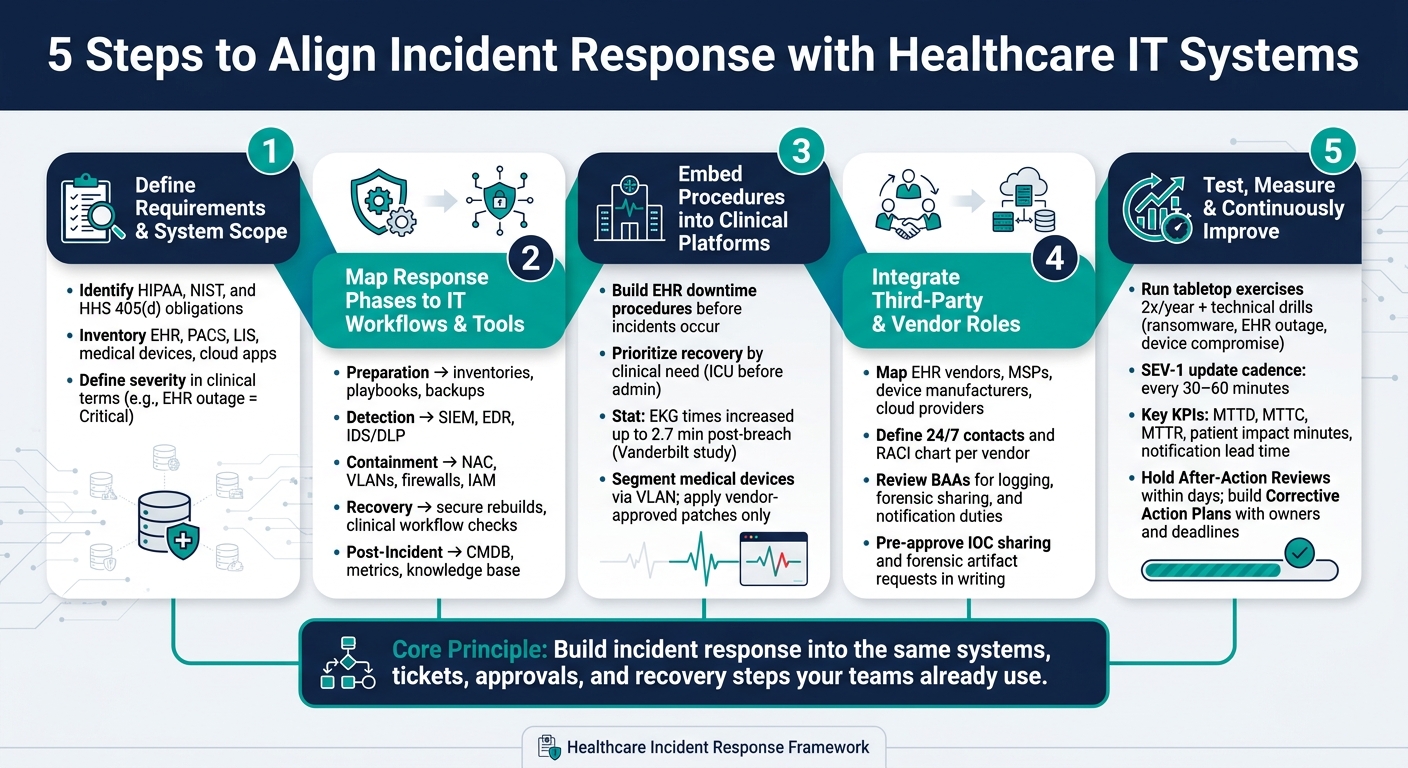
5 Steps to Align Incident Response with Healthcare IT Systems
Why Incident Response Fails (And It’s Not the Technology)
sbb-itb-535baee
Step 1: Define Incident Response Requirements and System Scope
Start by spelling out what you need to protect and which rules apply. This step sets the base for the rest of the plan. It connects incident response to the actual IT setup, so you're not building a paper process that falls apart in practice.
You want clarity on three things up front:
- Regulatory duties
- The systems and data in scope
- How work moves through IT and security today
Identify Regulatory and Operational Requirements
The HIPAA Security Rule requires documented incident handling, evidence, and data-classification policies. That means evidence handling, escalation paths, and notification duties need to be defined in writing before an incident happens. [1]
It also makes sense to bring in NIST and HHS 405(d) guidance where it fits your program. [2] State-specific breach notification laws can add more rules, and law enforcement holds on notifications can change timing, so legal counsel should be involved early. [1]
Severity should be defined in clinical terms, not just technical ones. For example, "Critical" shouldn't only mean a severe malware event. It should also cover a patient-safety risk or an EHR outage. Review BAAs as well, since they may set rules for logging, notification, and third-party response duties. [1]
| Requirement Category | Key Elements to Define |
|---|---|
| Regulatory | HIPAA Security Rule (incident handling, evidence, reporting), HIPAA Breach Notification Rule, state-specific privacy laws |
| Contractual | Business Associate Agreements (BAAs), vendor notification timelines, third-party response duties |
| Internal Policy | Data classification (PHI/PII), evidence chain-of-custody, clinical downtime procedures, incident severity matrix |
Inventory the IT Systems That Must Be Included in Response Planning
A response plan is only as good as the system map behind it. If the map is out of date, the plan will miss the very systems your team needs during containment and recovery.
At a minimum, scope should include EHR/EMR platforms, PACS, Laboratory Information Systems (LIS), clinical communication tools, Identity Providers (IdP), domain controllers, cloud-hosted clinical applications, and connected medical devices. Each one may matter for containment, recovery, evidence, or escalation. [1][2]
Use current asset and configuration data, and review the inventory at least once a year. Bring in clinical engineering and biomedical teams too. Medical devices often sit outside normal IT asset management, and that's where gaps can hide. [2]
Document Current ITSM and Security Workflows
Most health systems already run change and incident management through an ITSM platform. The point here isn't to replace those workflows. It's to make sure security incident handling fits inside them, not off to the side as a separate process.
Document how an IT event gets logged, escalated, and resolved today. Then look for places where security actions, like host containment or evidence preservation, don't clearly fit. A system slowdown, for instance, might be sent through as a performance ticket when it should trigger a security escalation because of patient safety risk. [1]
Standardize intake forms, timelines, and evidence logs so ITSM and security teams work from the same record.
Once scope is clear, map each response phase to the systems and tools that carry it out.
Step 2: Map the Incident Response Lifecycle to IT Workflows and Tools
Once you’ve documented system scope, the next move is simple: connect each incident response phase to the tools and teams that will do the work. Use the NIST lifecycle to turn policy into actions across your healthcare setup. When that map is in place, you can turn each phase into system-level playbooks and runbooks.
Connect Each Response Phase to Specific Systems
Tie each phase to the systems and people responsible for it. That means:
- Preparation: inventories, playbooks, and backups
- Detection and Analysis: SIEM, EDR, and IDS/DLP
- Containment: NAC, VLANs, firewalls, and IAM
- Recovery: secure rebuilds, plus checks for pharmacy, lab, imaging, and revenue-cycle workflows before full cutover
- Post-Incident Review: CMDB, metrics, and the knowledge base [1]
In a hospital, this mapping can’t stay at the policy level. It has to reflect how work gets done in practice. A containment step that looks fine on paper may be risky if it cuts off a device tied to patient care.
That’s why clinical sign-off should be required before isolating life-critical devices. Pre-authorized isolation should apply only to nonclinical systems. [1]
Build Incident-to-System Response Matrices
A response matrix takes a broad plan and turns it into a checklist people can use under pressure. For each incident type, it should answer four things: which systems are involved, which actions are pre-approved, what needs human sign-off, and which teams need notice.
| Incident Type | Primary Systems | Alert Source | Ownership | Key Runbook Actions |
|---|---|---|---|---|
| Ransomware | EHR, Backups, Domain Controllers | EDR / SIEM | Security Ops & EHR Owners | Host isolation; disable cloud backup sync; activate downtime procedures |
| Medical Device Compromise | Clinical VLAN, Infusion Pumps, PACS | NDR / Anomaly Detection | Clinical Engineering (Biomed) | Segment device; coordinate with bedside staff before disconnect |
| Unauthorized PHI Access | EHR, LIS, Identity Provider (IdP) | DLP / Log Management | Privacy Officer & App Owners | Revoke tokens; rotate credentials; initiate HIPAA risk assessment |
| Cloud Service Outage | SaaS EHR, Cloud Storage | Vendor Notification / Service Desk | Third-party Partners & IT | Verify BAA obligations; switch to local read-only EHR if available |
PHI data-flow mapping matters a lot here. If you already know how protected health information moves across EHR, PACS, and cloud services, you can act fast during a data exfiltration event. Otherwise, teams end up trying to trace those paths in the middle of the incident, which is the worst time to do it.
These matrices turn policy into execution.
Align Ticketing, Escalation, and Runbooks with Security Operations
Classify by enterprise risk and clinical impact first, followed by technical severity:
- Critical: patient-safety risk, EHR outage, or major PHI exposure
- High: active attacker activity; escalates to SecOps and network engineering
- Medium: SOC triage
- Low: logging [1]
When incident workflows are tied to standard procedures, teams can build playbooks into daily operations. But any action that affects clinical systems should still include human approval checkpoints. In plain terms, automation is useful, but it shouldn’t make bedside-impact decisions on its own.
Attach containment checklists, isolation forms, and HIPAA risk-assessment worksheets to each runbook. That paper trail matters just as much as the technical response when regulatory reporting enters the picture.
With routing rules in place, the next step is embedding those actions into clinical platforms and recovery workflows.
Step 3: Embed Response Procedures into Critical Healthcare Platforms and Data Flows
Put those decisions straight into EHR, device, identity, and recovery workflows.
Integrate Response with EHRs, Downtime Procedures, and Recovery Workflows
If an EHR goes down during an incident, clinical staff need a clear path they can use right away. Not a rough idea. Not a plan buried in a folder. They need documented downtime procedures and a pre-approved recovery sequence in place before anything goes wrong.
The order of recovery matters more than many IT teams think. Systems should come back based on clinical need, not what feels easiest to restore. ICU systems should come before admin platforms. A Vanderbilt University study found that following a data breach, the average time to EKG increased by as much as 2.7 minutes, and post-breach recovery work contributed to an increase in the 30-day mortality rate for heart attacks, translating to as many as 36 additional deaths per 10,000 heart attacks per year. [3]
Before any system returns to full use, check HL7 interfaces, order and result flows, and scheduling stability. After that, reconcile downtime documentation and queued transactions back into the EHR.
That same recovery sequence should also guide device and access restoration.
Address Medical Devices, Network Segmentation, and Privileged Access
Bring biomedical/clinical engineering into the CIRT. Use the system inventory to see which devices need quarantine and which ones need bedside coordination. If a device may be compromised, move it to a quarantine VLAN. Then apply only vendor-approved patches or signed firmware, and do that only after bedside confirmation.
| System Type | Priority Level | Primary Response Procedure | Key Stakeholders |
|---|---|---|---|
| EHR / Clinical Apps | Critical | Activate downtime workflows; validate HL7 interfaces post-recovery | EHR Owners, Clinical Leads |
| Identity (IdP/AD) | Critical | Revoke tokens; rotate domain-wide credentials; enforce MFA | IT Security, IAM Team |
| Medical Devices | Critical | Network segmentation (VLAN isolation); vendor-approved patching | Biomedical/Clinical Engineering |
| Network Segments | High | NAC-based restrictions; firewall C2 blocking | Network Engineering |
| Backups | High | Restore from "golden images"; integrity validation before cutover | Backup Admin, Security Ops |
Track these dependencies in the same risk record used for remediation.
Use Risk Management Data to Track Dependencies and Remediation
Use risk data to track affected assets, dependencies, owners, and remediation status across PHI, clinical apps, medical devices, and supply chains. Censinet RiskOps™ can centralize dependency maps, third-party assessments, and remediation tracking across PHI, clinical apps, devices, and supply chains.
Step 4: Integrate Third-Party Risk into Incident Response
Third-party relationships shape detection, containment, and recovery. Use the dependency map from Step 3 to pinpoint which vendors can affect containment or recovery. Treat vendors as part of the response workflow, not just a list of outside contacts.
EHR vendors, cloud service providers, medical device manufacturers, MSPs, and IR retainers all touch your systems in ways that directly affect how fast you can act. If those links aren't mapped before something goes wrong, response and recovery slow down.
Document Vendor Notification Paths and Shared Response Responsibilities
Every vendor that can access PHI, clinical workflows, or recovery-critical systems needs a clear role in your response structure. In plain terms, you need named 24/7 contacts and a RACI chart that spells out who owns what during an active incident.
Review BAAs for logging, forensic sharing, and notification duties that line up with HIPAA and state law.
When an incident affects a hosted clinical system - EHR, identity, cloud storage, or medical devices - share indicators of compromise (IOCs) with the right vendor fast. Then request forensic artifacts or event timelines from their environment. These coordination steps should be approved in writing before an incident happens. That way, you're not sorting out process details in the middle of a crisis.
| Documentation Element | Purpose in Incident Response |
|---|---|
| Escalation Matrix | Defines who to notify by vendor contact based on incident severity |
| BAA Notification Duties | Establishes the legal timeframe and method for reporting breaches |
| Logging Expectations | Ensures vendors provide telemetry needed for threat hunting and forensics |
| Clinical Safety Guardrails | Pre-authorized isolation actions for medical devices developed with vendors |
Link Vendor Risk Assessments to Incident Response Decisions
Risk assessment data shouldn't live in a separate workflow with no tie to the response team. If a vendor's system is part of an incident, your team needs answers right away:
- What data and systems does this vendor access?
- What interfaces does it touch?
- Has a recent assessment flagged any unresolved findings?
Censinet RiskOps™ centralizes third-party risk data so response teams can see access, interfaces, and unresolved findings during an incident. Use those assessment findings to decide whether connected systems stay online, move to containment, or need vendor-approved remediation.
In practice, vendor risk context helps your team decide whether to isolate, patch, or escalate. Test those vendor handoffs in the next step's tabletop exercises and technical drills.
Step 5: Test, Measure, and Continuously Improve IT-Aligned Incident Response
Step 5 closes the loop. At this point, you're not writing plans on paper anymore. You're testing whether the playbooks, controls, and handoffs you built into IT and clinical workflows still hold up when things get messy.
The point of these drills is simple: prove that the workflows, isolation steps, and recovery paths from earlier steps work under pressure.
Run Tabletop Exercises and Technical Drills Tied to Real Systems
Run tabletop exercises twice a year and technical drills for ransomware, EHR outages, medical device compromise, and unauthorized PHI access [1][4]. Bring in incident command, IT, security, clinical operations, privacy, and biomedical engineering. Then test the moves that matter in a live event:
- Host containment
- VLAN quarantine
- NAC restrictions
- Credential rotation
- Downtime procedures
- Patient diversion
- Reconciliation
These exercises should map to the exact systems already scoped in earlier steps: EHR, identity, network controls, medical devices, and vendor handoffs.
After every exercise or incident, hold an AAR within days. Use the 5 Whys to get to root causes. Then turn what you find into a CAP with owners, deadlines, and budget. That's how lessons stop being talk and start becoming work.
Track Metrics That Show Whether Response Supports Care Continuity
You also need metrics that show whether incident response helps keep care moving.
If a drill looks good from an IT angle but still throws clinical teams off course, the plan isn't aligned.
| KPI Category | Metric | What It Tells You |
|---|---|---|
| Detection & Containment | Mean Time to Detect (MTTD), Mean Time to Contain (MTTC) | How fast your team identifies and isolates an incident |
| Recovery | Mean Time to Recover (MTTR), Clinical Readiness Score | Whether IT recovery matches operational readiness for care delivery |
| Clinical Impact | Patient impact minutes, number of diverted patients | Real-world effect on care delivery during downtime |
| Compliance | Notification lead time, PHI records affected | Ability to meet HIPAA and state notification requirements |
| Program Health | Action closure rate, percentage of critical assets covered by playbooks | Whether gaps from past incidents are actually getting fixed |
For SEV-1 incidents, meaning events with immediate patient safety risk or an EHR outage, track whether your team keeps an update cadence of every 30 to 60 minutes [4]. Before you return to normal operations, run Clinical Readiness Checks across pharmacy, lab, imaging, and revenue cycle. The goal is to confirm that HL7 interfaces and data flows are working correctly before full cutover [1][4].
Those metrics should feed the next round of playbook updates.
Conclusion: Build Incident Response into the Systems That Keep Care Running
This step closes the loop by testing whether your response process still fits the systems that keep care running.
Censinet RiskOps™ helps keep third-party risk data, vendor findings, and enterprise risk context in one place as systems and incidents change. The goal is a response process that stays aligned as systems change.
FAQs
Which systems should we prioritize first?
Prioritize assets based on how much they affect patient care and data security. Start with a clear inventory of hardware, software, and data repositories. Then give the most attention to Tier 0 and Tier 1 systems, such as identity management, EHR, PACS, LIMS, and medication platforms.
It also makes sense to move high-risk assets to the front of the line. That includes ePHI databases and connected medical devices. Censinet RiskOps™ can help streamline risk assessments and improve visibility into critical systems.
Who should approve isolation of clinical systems?
The Incident Commander - often a senior leader like the CISO or CIO - should sign off on major containment steps, including isolating clinical systems.
That call can affect patient care, so it needs close coordination with clinical leadership. Pre-approved actions and clear escalation protocols help teams move fast without putting safety or continuity of operations at risk.
How often should we test the response plan?
Healthcare organizations need to test incident response plans on a regular basis if they want to stay ready.
A common schedule looks like this:
- Annual breach simulations
- Regular tabletop exercises
- Contact list and escalation procedure testing twice a year
Teams should also review contact details and procedures every month, then update the broader plan every quarter.
That steady rhythm helps protect patient data and keep clinical operations running.
