
Physical access failures still lead to HIPAA breaches. If someone can walk into a server room, wiring closet, records area, or front desk space and take a device or tamper with equipment, your digital safeguards may not matter.
Here’s the short version: I’d treat HIPAA facility access controls as four day-to-day checks tied to the Security Rule’s Physical Safeguards standard at 45 CFR § 164.310(a):
- Emergency entry rules for disasters and outages
- A written facility security plan for spaces tied to ePHI
- Identity and role checks for staff, visitors, and contractors
- Repair and change logs for locks, doors, readers, cameras, and related items
The article makes one point clear: weak physical controls can cost a lot. Lost or stolen equipment made up 17% of data breaches, while OCR received 50+ large breach reports tied to stolen devices from 2020 to 2023, affecting more than 1,000,000 people. And the $3.5 million Fresenius settlement shows what can happen when facility controls fail.
If I had to boil the article down into a simple action list, it would be this:
- Limit entry by job role
- Review badge and key access when people are hired, moved, or leave
- Use visitor logs, escorts, and temporary badges
- Test emergency facility access before an outage happens
- Log all security-related repairs and keep records for at least six years
This is less about policy binders and more about whether your doors, badges, logs, and repair records hold up when someone checks them.
4 HIPAA Physical Safeguard Standards
The Four HIPAA Facility Access Control Specifications
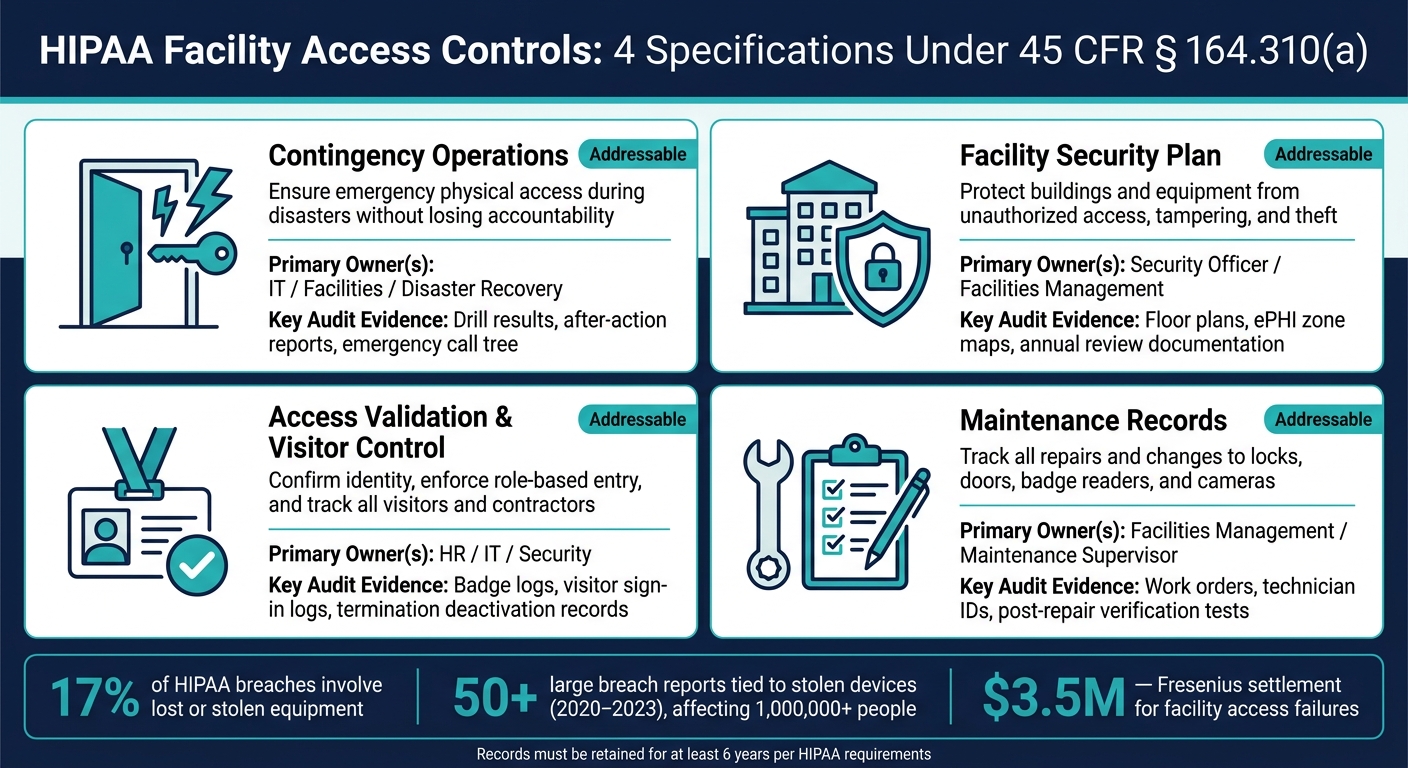
HIPAA Facility Access Controls: 4 Specifications at a Glance
All four specifications under 45 CFR § 164.310(a) are addressable. That means you either put them in place as written or document another control that fits your risk analysis. The goal is simple: turn the rule into day-to-day facility habits people can follow.
Contingency Operations: Emergency Access Without Losing Control
HIPAA's contingency operations specification requires documented procedures for physical access to facilities during emergencies or disasters to restore access to systems and data and support contingency plan execution.
In day-to-day terms, this often means setting up emergency access ahead of time. You might keep sealed master keys ready or use badge readers that still work offline, with pre-approved roles such as an IT recovery lead. A two-person rule for emergency server room entry helps keep access available without giving up oversight. Run drills on a regular basis, and keep the drill results plus after-action reports [4][5][7].
Facility Security Plan: Protecting Buildings, Rooms, and Equipment That Support ePHI
This specification calls for a written plan to protect spaces and equipment that support ePHI from unauthorized access, tampering, and theft. A common way to handle this is to sort areas into Public, Controlled, Restricted, or High-Restriction, then match each area with the right safeguards. That can include badges, cameras, alarms, biometric locks, or security guards for spaces and equipment that could expose ePHI if someone gets in, tampers with them, or steals them [1][3][6][7].
The 2018 Fresenius Medical Care North America settlement shows what weak facility controls can lead to. OCR resolved the matter for $3.5 million after five breach incidents, including theft of equipment from FMC facilities, and found that the organization had failed to safeguard its facilities and equipment from unauthorized access and theft [1][2].
Access Validation, Visitor Control, and Maintenance Records
Once the layout is locked down, the next job is deciding who gets in and keeping proof of it.
Grant badges and keys by role, and verify identity first. Badge and key access should connect to HR lifecycle events, so access gets reviewed when someone changes jobs and removed when they leave.
For visitors, track the person's name, host, purpose, and entry and exit times. Issue temporary badges, and require escorts in restricted areas. Those temporary badges should look clearly different from employee badges [1][3][4].
Maintenance records matter too. Document repairs and changes to locks, doors, walls, badge readers, and cameras. Record the date, time, location, work performed, and who approved and completed it. After repairs, test the lock, reader, and alarm. HIPAA requires policies, procedures, and supporting records to be kept for at least six years [1][7][8].
Use the table below to assign ownership and gather audit evidence for each control.
| Specification | Primary Owner | Key Audit Evidence |
|---|---|---|
| Contingency Operations | Facilities / IT / Disaster Recovery | Drill results, after-action reports, emergency call tree |
| Facility Security Plan | Designated Security or Facility Lead | Floor plans, zone maps, annual review documentation |
| Access Validation | HR / Facilities | Access rosters, badge issuance logs, termination records |
| Visitor Control | Front Desk / Security | Sign-in logs, escort records, temporary badge logs |
| Maintenance Records | Maintenance Supervisor | Work orders, repair logs with date, time, location, and technician identity |
Policy and Control Comparison Table
Mapping Each Specification to Ownership and Evidence
The table below adds purpose and review cadence to the ownership and evidence map above.
| Specification | Purpose | Typical Documentation | Primary Owner | Review Cadence |
|---|---|---|---|---|
| Contingency Operations | Make sure staff can get emergency access to facilities so data restoration and clinical care can continue during an incident | Emergency access procedures, contact trees, emergency access logs, post-incident reviews | IT, Facilities, Emergency Management | Annual drills |
| Facility Security Plan | Protect buildings and equipment from unauthorized access, tampering, and theft | Written security plan, floor plans with ePHI zones, surveillance and alarm diagrams, risk assessments | Security Officer, Facilities Management | Annual review and update |
| Access Validation and Visitor Control | Confirm identity and allow role-based entry to sensitive areas; track visitors and contractors | Access rosters, badge and key issuance logs, visitor sign-in logs, escort records, termination deactivation logs | HR, IT, Security | Quarterly and on personnel changes |
| Maintenance Records | Track repairs and changes to physical security components | Work orders, technician IDs, repair descriptions, verification tests confirming restored security | Facilities Management, Maintenance Supervisor | After each repair; periodic audits |
Shared buildings and outside contractors still count here. If a landlord, cleaning crew, or repair tech enters a space tied to ePHI, record that access in visitor logs or maintenance records.
sbb-itb-535baee
Best Practices and Common Compliance Gaps
Best Practices That Strengthen Control and Audit Readiness
Use minimum necessary physical access so people can enter only the areas their jobs call for. A simple way to do this is to map roles to public, controlled, restricted, and high-restriction zones, then give each role only the access it needs. That supports contingency operations, facility security, access checks, and maintenance records. But here's the catch: none of it holds up if access rules aren't documented, tested, and removed when roles change.
It also helps to connect badge provisioning to the HR lifecycle. That way, access updates happen the same day someone is hired, moved to a new role, or terminated. For high-risk zones, add a second factor, like a smart card plus PIN or biometrics. Anti-passback controls can flag repeated badge use or tailgating, which gives security teams another way to spot misuse before it turns into a bigger problem.
Vendors and contractors need tighter guardrails. Give them time-bound badges with a visible expiration date, require escorts in restricted areas, and shut off access the moment the project ends. Temporary access has a way of lingering if no one owns the cleanup.
Emergency access needs its own drill. Test it before an outage happens so staff can still reach critical areas without losing accountability. Sealed master keys or offline-capable readers kept in logged containers give teams a documented way to enter during a power outage or disaster.
Keep access policies, logs, and remediation evidence in one place. When audits or internal reviews come around, that saves time and makes current records much easier to show.
Common Gaps That Create Avoidable HIPAA Exposure
Even solid policies can fall apart in day-to-day work. The biggest problems are still operational: weak logging, delayed deactivation, and poor scope control. Common findings include incomplete or unsigned visitor logs, shared badges or keys, and temporary staff with access that goes beyond job need. These issues tend to show up when access isn't reviewed against current duties or when contractor access stays active too long.
Two audit findings are easy to miss because they don't always look urgent at first. Undocumented repairs are one. Incomplete scope is the other. Every repair to a lock, reader, or camera should be logged. And the facility plan should cover spaces that often get skipped, including wiring closets, telecom rooms, and unattended workstation areas.
Conclusion: Building Facility Access Controls That Hold Up in Practice
Taken together, these controls work only when physical security is handled like a day-to-day operating process, not a policy binder sitting on a shelf. Facility access controls do their job only when they’re documented, assigned to specific people, and tested. The gap between a security program on paper and actual physical access control is exactly what these specifications are meant to close.
The price of ignoring that gap is measurable. The Fresenius settlement showed the cost of weak physical controls: $3.5 million for breaches tied to stolen unencrypted devices from facility sites.[2]
OCR has warned that facility access controls should not be treated as a box-checking exercise.
These controls keep working when physical access is managed as a continuing risk, with clear ownership and regular testing. Role-based access, visitor management, documented maintenance, and tested emergency procedures are not one-time setup tasks. They need review, updates, and verification on a regular basis. HIPAA requires six-year retention of related policies, procedures, and records.[2] That’s what helps protect patient data when facilities, staff, and vendors all need access at different times.
FAQs
What counts as a facility under HIPAA?
Under HIPAA, a facility is any physical place where electronic systems that store, process, or transmit ePHI are located.
That could mean a whole building. Or it could be a single room, cabinet, or locked cage that holds servers, network gear, or backup media.
Common examples include:
- Data centers
- Server rooms
- Nurse stations
- Clinical care sites
- Corporate offices with workstations or other infrastructure tied to ePHI workflows
How often should facility access controls be reviewed?
Facility access controls should be reviewed on a regular schedule to support security and compliance. A common approach is to run quarterly audits of physical access lists and key holders.
Log reviews matter too. For high-security restricted areas, a weekly review often makes sense. For organization-wide logs, monthly checks are common. It also helps to do spot checks from time to time on locks and badge readers.
What records should we keep for HIPAA access controls?
Keep records that show how your facility access controls are set up and how well they work. That includes:
- your facility security plan, policies, and procedures
- maintenance records for doors, locks, and alarms
- access rosters, visitor logs, and periodic access reviews
Keep these records for at least six years.
