
If you handle ePHI, you need to know where it lives, how it moves, whether it’s encrypted, who controls the keys, and how you prove all of that.
I’d boil this article down to five checks:
- Map every ePHI location and data path
- Separate data at rest from data in transit
- Use modern encryption for both
- Lock down keys, access, and vendor duties
- Test, monitor, and document everything for six years
A few points stand out fast:
- HIPAA treats encryption as addressable, which means you must assess it and document your choice
- Breaches still hit healthcare hard, and hacking and IT incidents make up most large cases , highlighting the need for proactive cyber risk management
- Proper encryption can help with HITECH breach-notification safe harbor
- Old systems, backups, logs, test data, and vendor copies are often where gaps show up
- TLS 1.2 or 1.3, AES-256, centralized key control, certificate tracking, and written exceptions are common baseline checks
Here’s the article in one plain-language view:
| Area | What I’d check first | What can go wrong |
|---|---|---|
| ePHI inventory | Systems, devices, backups, test copies, exports | Data gets missed |
| Data movement | APIs, portals, email, HL7, FHIR, VPNs | Weak or partial transit encryption |
| Data at rest | Endpoints, databases, files, archives | Lost devices or exposed storage |
| Keys and access | KMS/HSM, rotation, RBAC, dual control | Keys exposed or over-shared |
| Vendors | third-party risk management controls, BAA terms, and backup coverage | Third-party gaps |
| Proof | Tests, logs, alerts, exceptions, reviews | Audit trouble and risk records with holes |
If I were using this checklist, I’d treat it as a working control list, not a one-time setup. The goal is simple: find every place ePHI exists, encrypt it where it should be encrypted, and keep records that show the control still works.
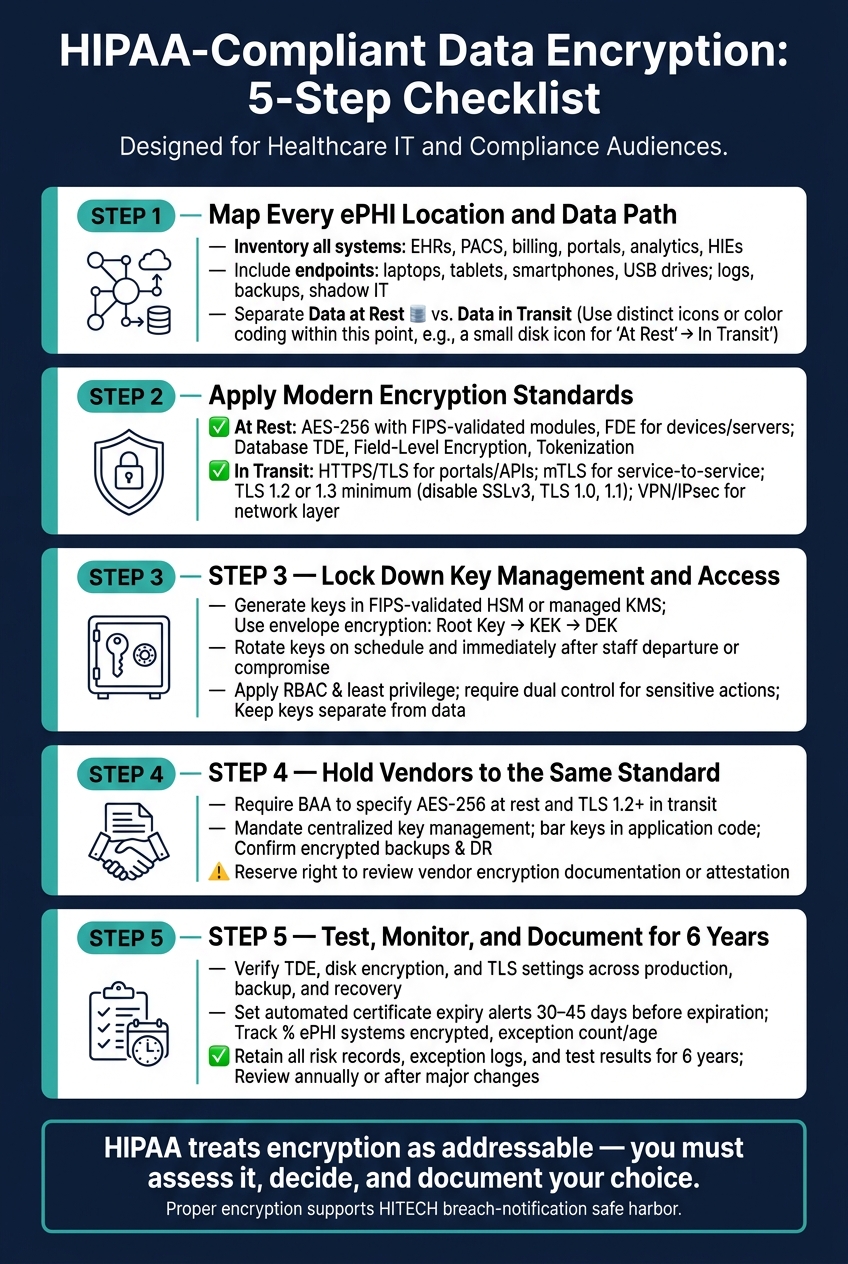
HIPAA-Compliant Data Encryption: 5-Step Checklist
5 Things HIPAA Compliance Auditors Check! (Most Healthcare Orgs Miss #5)
Understanding these audit checkpoints is critical for measuring what matters for cybersecurity in a clinical environment.
sbb-itb-535baee
1. Inventory ePHI and Map Every Data Flow
Start by listing every place ePHI is created, received, maintained, or transmitted. HIPAA requires an accurate, thorough risk assessment across all ePHI.[8][9] That means you need a clear inventory first. Once you have it, map where the data lives and how it moves from one place to another.
List Every System, Device, and Storage Location That Handles ePHI
Include every system, device, and storage location that touches ePHI. This should cover clinical systems like EHRs, PACS, lab tools, and pharmacy platforms, along with billing and revenue cycle systems, patient portals, analytics tools, and health information exchanges.[10][12][13]
Don’t stop at the big systems. Local endpoints matter too, especially ones that can store data outside your main stack. That includes laptops, tablets, smartphones, USB drives, and portable medical devices.[14][15]
You also need to document places people often miss, such as logs, backups, disaster recovery replicas, and test environments - anywhere a copy of production ePHI might exist.[8][1] The same goes for shadow IT, local spreadsheets, and one-off exports that staff may create outside approved workflows.[8][9]
For each asset, record its current encryption status. That makes gaps much easier to spot.
Separate Data at Rest from Data in Transit
Next, divide assets into two buckets: data at rest and data in transit. The risks are not the same, so the controls shouldn’t be either.
Data at rest includes databases, file shares, object storage, archives, local disks, backup media, and disaster recovery replicas. Data in transit includes information moving through patient portals, HL7 message exchanges, FHIR APIs, DICOM transfers, VPN connections, email, telehealth sessions, and other network paths.[10][11][13]
For each transmission path, document:
- Both endpoints
- The transport method
- Whether encryption is end-to-end
This helps you spot weak points early, especially older protocols that can turn into breach exposure if no one is paying attention.
Classify High-Risk Data That May Need Stronger Controls
Some ePHI carries more risk than others. Focus first on the fields where exposure could do the most harm. Social Security numbers, diagnoses, biometric identifiers, payment data, and clinical notes may call for stronger controls, such as field-level encryption or tokenization.[10][12]
Rank this data by sensitivity and by the effect its exposure would have on operations. That priority list gives you a practical way to decide where stronger controls should go first.
2. Apply Encryption Standards for Data at Rest and in Transit
Use your inventory to match each data flow with the lightest control that still does the job.
Encrypt Stored ePHI with NIST-Aligned Methods
For stored ePHI, use AES based on NIST SP 800-111 guidance, most often AES-256, with FIPS-validated cryptographic modules as the minimum bar.[7][21][20]
The method should fit the asset. Start with the strongest protections for the highest-risk data.
| Method | Best Use |
|---|---|
| Full-Disk Encryption (FDE) | Laptops, desktops, servers, portable devices |
| Database TDE | EHR databases, clinical registries, billing systems |
| File-Level Encryption | Shared network drives, imaging repositories, PHI folders |
| Field-Level Encryption | SSNs, diagnoses, financial data, biometric identifiers |
| Tokenization | Analytics pipelines, third-party integrations, MRNs |
In the field, many healthcare organizations stack these controls. A common setup looks like FDE on endpoints, TDE on core EHR databases, file-level encryption on shared drives, and tokenization for data sent into analytics or third-party systems.[16][18][20] That same approach should cover backups, snapshots, and archives for the full retention period.[16][17][20]
Require Modern Transport Encryption for All ePHI Transmissions
Don’t treat stored data and moving data the same way. They need different controls.
Use HTTPS/TLS for portals and APIs, mTLS for higher-risk service-to-service traffic, S/MIME or secure portals for email, and VPN/IPsec when you need protection at the network layer.[7][20] For patient-facing email, secure portals are usually the better path. Use S/MIME when certificate management is workable. For server-to-server email, enforce TLS for SMTP, but don’t assume transport encryption by itself gives you end-to-end protection for sensitive PHI.[18][20]
This process is a critical component of HIPAA-compliant vendor risk management. Next, lock down key ownership and administrative access.
3. Secure Key Management, Access Control, and Vendor Obligations
Once your encryption standards are set, the next job is simple to say and hard to get wrong: control the keys that unlock the data.
Here’s the plain truth. Encryption falls apart when keys are exposed. If a key sits next to the data it protects, gets shared with too many people, or lands with a vendor under vague rules, the whole setup starts to crack.
Protect Keys with Centralized Lifecycle Management
Every key has a lifecycle: generation, storage, rotation, backup, revocation, and destruction.
Generate keys in a FIPS-validated HSM or managed KMS, not in application code.[19][29] Store root and master keys only in that HSM or KMS, and use envelope encryption so a root key protects Key Encryption Keys (KEKs), which protect the Data Encryption Keys (DEKs) that actually encrypt ePHI.[22][28][29] In short, keep keys separate from the data they protect. And don’t let unmanaged endpoints hold both a key and the data it decrypts.[19][24][25][29]
Set crypto-periods in line with NIST SP 800-57, rotate keys on a regular schedule, and rotate them right away if an administrator leaves, a system is compromised, or an algorithm is deprecated.[19][26][27] Keep encrypted backups of critical keys in separate secure locations, and spell out revocation and recovery procedures so a compromised or obsolete key can be replaced without stopping proper decryption of needed ePHI.[19][22][26] When keys reach end of life, destroy them through zeroization or secure overwriting and record the event in your HIPAA documentation.[19][26]
Restrict Who Can Manage Keys and Encryption Settings
Access to keys and encryption settings should follow RBAC and least privilege to support HIPAA access-control requirements.[30][32]
Split duties across separate roles for key administration, application use, and security review. For sensitive actions such as creating root keys, disabling HSM protections, or mass key exports, require dual control. That means at least two authorized administrators must approve the action, so no one person has full access to the key material.[22][26][34]
Changes to encryption settings, including cipher suites, TLS configurations, and database encryption options, should go through formal change management with documented approvals, risk assessment, and a rollback plan.[25][29] Tie key operations to individual identities through centralized authentication and send those logs to your SIEM. Audit controls under 45 CFR 164.312(b) are required, not addressable. Encrypt key-management logs at rest and in transit.[31][33] Keep related policies, procedures, and exception records for at least six years.[3][19]
Require Equivalent Encryption Controls from Business Associates
Any vendor that creates, receives, maintains, or transmits ePHI must meet the same encryption and key-management standards under a BAA. Those controls must cover every ePHI path already mapped in your data-flow inventory.
BAAs should spell out AES-256 at rest and TLS 1.2+ in transit, require centralized key management with keys separated from ePHI, and require root and master keys to remain in an HSM or managed KMS.[19][24][25][29] They should also bar storing keys in application code or unprotected repositories, require prompt notice of suspected key or encryption compromise, confirm that backups and disaster recovery copies are encrypted under the same controls, and preserve your right to review the vendor's encryption documentation or independent attestation.[23][25]
Then verify those requirements across production, backups, and recovery.
4. Validate, Monitor, and Document Encryption Compliance
Setting encryption rules and key management standards is only half the job. You also need to prove those controls work the same way in every environment, not just once, but over time.
Test Encryption Coverage Across Production, Backup, and Recovery Environments
Use the inventory, standards, and key controls from Steps 1 to 3 to check what’s actually in place. Start with the Step 1 inventory and verify every production, backup, and recovery environment.
For databases, confirm that Transparent Data Encryption (TDE) is enabled, key lengths are set to AES-256, and only approved service accounts can decrypt data. For servers and endpoints, verify that disk encryption is turned on - BitLocker on Windows and FileVault on macOS - and that keys are centrally managed with documented recovery procedures. Replicas and failover systems need the same level of review. Run a failover test and confirm that standby instances use the same encryption controls as production.[2][19]
Run restore tests from each backup tier, including daily operational backups and long-term archives, into a non-production environment. Then confirm encrypted recovery.[2]
Review certificates, protocol versions, and cipher suites on every ePHI interface. Confirm that TLS 1.2 or 1.3 is enabled and that older protocols - SSLv3, TLS 1.0, and TLS 1.1 - are disabled. Cipher suite reviews should verify that strong options like AES-GCM and ECDHE are in use, while weak or deprecated options like RC4 and 3DES are blocked.[2]
Build these checks into your CI/CD pipelines. Infrastructure-as-code templates should turn on encryption at rest by default, and pre-deployment tests should block any service that handles ePHI but lacks TLS 1.2+ or uses certificates from unapproved CAs. Every blocked deployment should create a record you can use during an audit. Centralizing these records within a risk exchange ensures visibility across the organization.[19][4]
Monitor for Drift, Exceptions, and Expired Certificates
Once validation is done, the next job is watching for changes that knock systems out of the approved baseline. Encryption drifts unless someone keeps an eye on it.
Use continuous monitoring to compare live settings against approved baselines. If encryption settings change outside normal change management, your monitoring should flag that right away.[19]
Legacy systems and medical devices that can’t encrypt should be tracked as time-bound exceptions. Log each one, tie it to compensating controls like network isolation and enhanced logging, and assign an owner plus a review date.[6][5][18][4]
Set automated alerts for expiring certificates at least 30 to 45 days before expiration. An expired certificate can do more than throw an error message. It can take down a clinical system and trigger HIPAA breach risk assessments.[36]
Useful metrics to track include:
- The percentage of ePHI systems with encryption enabled at rest and in transit
- The number and age of documented exceptions
- Time to remediate non-compliant configurations
- Certificate renewal lead time[2][4]
Maintain Audit-Ready Documentation and Risk Records
Keep the tested configuration, any exceptions, and the risk decision in the same record. That makes reviews much less painful later.
Document whether encryption is enabled, not enabled, or replaced by a documented equivalent control. For each system that handles ePHI, record the system’s role, the ePHI types involved, encryption-at-rest settings, transport encryption settings, key management processes, and references to the governing policies.[2][19]
Risk analysis records should explain why encryption is reasonable and appropriate - or, if it isn’t used, what other measures are in place. HHS has made clear that failing to document a decision not to encrypt in a high-risk scenario can be treated as willful neglect.[35]
Failed tests, exceptions, and certificate alerts must be logged as enterprise risk items. Retain those records for six years, and review them every year or after major changes.[19][4]
Conclusion: A Practical HIPAA Encryption Checklist for Healthcare Organizations
A defensible HIPAA encryption program comes down to five controls: inventory ePHI, encrypt data at rest and in transit, manage keys closely, hold vendors to the same bar, and keep validating and documenting those controls over time. Put simply, none of these steps works well in isolation. They need to support each other.
Encryption cuts financial exposure. So when encryption is strong, both exposure and the response burden go down.
It also helps protect continuity of care. Encrypted backups and tested recovery procedures help keep data private and make it easier to restore care after an incident.
Risk-management platforms can help teams track third-party assessments, compare controls and assessment questions, and follow remediation for PHI-related risk. But vendor risk doesn't stop at contract signing. It needs regular follow-through.
Treat encryption as an ongoing control, not a set-it-and-forget-it project. Update risk assessments when systems change, automate certificate and key management, and review exceptions on a regular basis. In HIPAA encryption, the goal is not a one-time fix. It's a system that stays current, verified, and audit-ready.
FAQs
Is HIPAA encryption required or recommended?
Required. Under updated HIPAA rules as of January 2025, encryption for electronic Protected Health Information (ePHI) is mandatory for data at rest and in transit. There are no exceptions for covered entities or business associates.
That matters for compliance, but it also matters when something goes wrong. If data is lost or stolen, properly encrypted information typically is not treated as a reportable breach under the Breach Notification Rule.
In plain English: encryption doesn't just protect ePHI. It can also cut legal and financial risk when an incident happens.
What counts as ePHI in backups, logs, and test systems?
ePHI in backups, logs, and test systems means any patient information that is created, received, stored, or sent electronically.
That can show up in more places than people expect. Common examples include database dumps, virtual machine snapshots, file backups, offsite archives, debug logs, ticket logs, audit trails, and non-production data such as CSV or Excel exports used for testing, development, or analytics.
How can we prove our encryption controls during an audit?
Keep a clear, documented evidence trail. Don’t rely on self-reported claims alone. Hold on to audit logs, security policies, and risk analyses for at least six years.
You should also keep a written risk analysis and an Encryption Coverage Matrix, along with:
- FIPS-validated module details
- Key lifecycle audit logs
- Vulnerability scan and penetration test records
- BAAs on key management
- Monitoring records and annual review documentation
