
Bad healthcare data can hurt patients, stall care, and trigger claim problems fast. In this article, I break the issue down to a few plain steps: lock down who can change records, catch bad data before it saves, monitor systems for silent changes, and test every backup restore before putting it back into use.
Here’s the short version:
- HIPAA requires protection against improper alteration or destruction of ePHI
- Medication lists, lab results, and patient matching errors can lead to patient harm
- Shared accounts, weak logs, copy-paste errors, bad interfaces, and damaged backups are common risk points
- The main fixes are RBAC, MFA, approval workflows, validation rules, hashes, audit logs, and restore testing
- After ransomware, a restore is not safe just because it boots
- Teams should verify database health, message queues, recent records, and clinician-facing data before cutover
- Third-party vendors matter too, because outside systems and device feeds can send bad or missing data into the chart
A few numbers show why this matters:
- 491 large U.S. healthcare breaches were reported from January 2024 to September 2024
- 91% of breached patient records came from hacking or IT incidents
- 81% of EHR-related patient safety events involved medication errors
- Healthcare ransomware incidents averaged 17 days of downtime
- Downtime costs were estimated at $1.9 million per day
If I had to reduce the full article to one line, it would be this: data integrity is not just a security task - it is a patient care, billing, and recovery issue. The rest of the piece shows where records break, how to stop that, and how to prove restored data is safe before people rely on it.
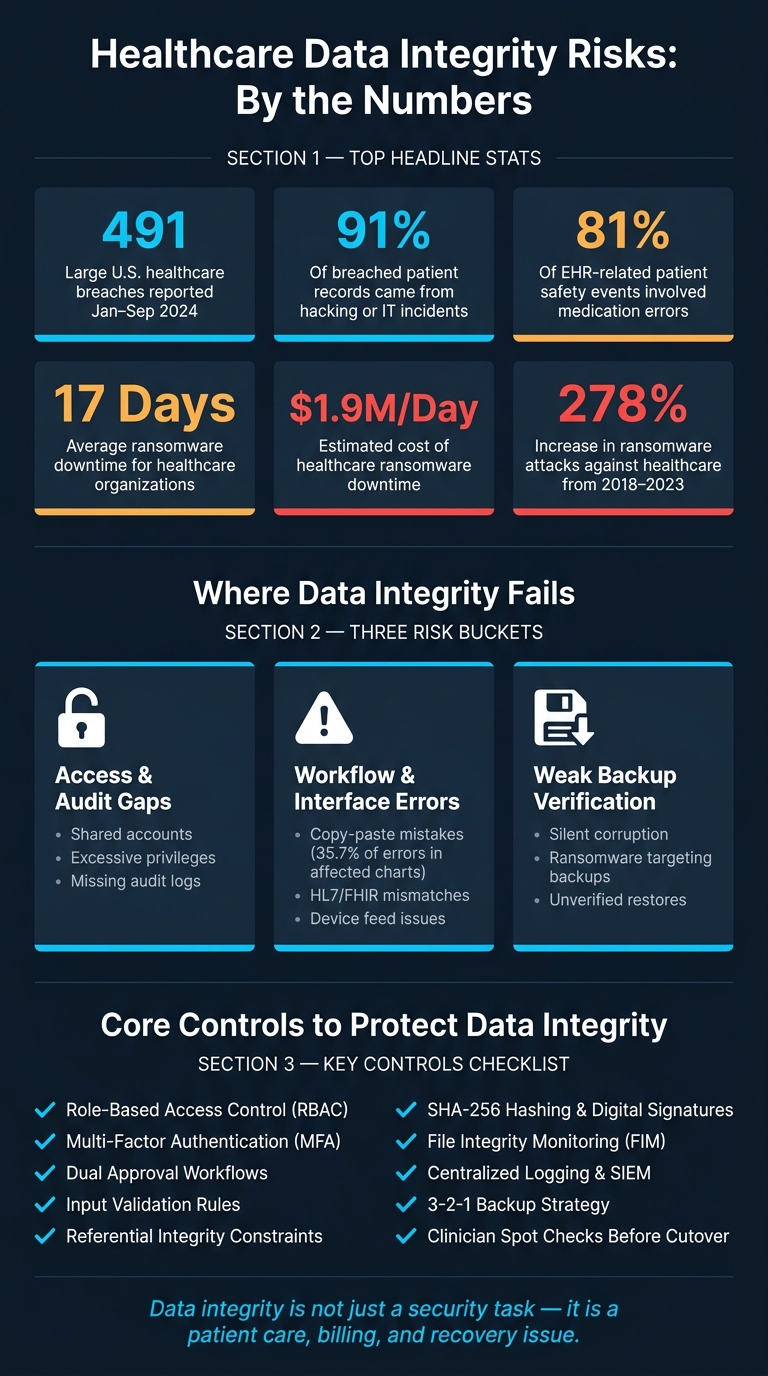
Healthcare Data Integrity Risks: Key Stats & Failure Points
Data Integrity, Documentation & End-to-End Traceability (Clinical–Lab Interface) QAI Standards
sbb-itb-535baee
The Most Common Data Integrity Risks in Healthcare
Healthcare data integrity failures usually start in a few familiar places: access controls, day-to-day workflows, connected systems, and backups. In practice, most of them fit into three buckets: access and audit gaps, workflow and interface errors, and weak backup verification.
Weak Access Controls, Missing Audit Trails, and Record Changes
Shared accounts are still a stubborn problem. If several staff members sign in with a generic username like "ED nurse" or "lab tech", there's no dependable way to tell who changed a medication order, updated an allergy, or edited a lab result. Excessive privileges create the same kind of risk. If staff can change records outside their role, or if permissions stay active after a role change, the door stays open for record changes that are hard to trace.[2][4]
Poorly set up audit logs make things worse. Without a full record of who accessed or changed what, and when, it becomes much harder to piece together what happened after an incident or malpractice claim. HIPAA requires audit controls, but many systems still don't log key events well enough to support a proper review, including allergy updates and order changes.[4][5][7]
EHR Workflow Errors, Interface Mismatches, and Third-Party Data Problems
Copy-paste mistakes are a known source of documentation errors in U.S. healthcare. A 2013 JAMA Internal Medicine study found that copy-paste mistakes contributed to 35.7% of errors in patients whose charts contained copied notes, and a malpractice carrier survey found that 71% of EHR-related malpractice claims involved copy-and-paste use.[10][11] A clinician might pull forward an old medication list, a resolved diagnosis, or a missing allergy from a prior note without fully checking it first.
Interface issues add another risk layer. If HL7 or FHIR mappings between an EHR and a lab, radiology, or third-party system are wrong, results may land in the wrong chart, attach to the wrong test, or fail to appear at all. Device feeds with missing timestamps or mismatched identifiers can also slip past validation and land in the wrong patient record.[4][5][6]
When connected systems send data to the wrong place, backups become the last safety net.
Backup Corruption, Ransomware, and Unverified Restores
Backup corruption is often silent. A backup job may show as successful even when the data inside it is already damaged. Preventing ransomware attacks makes that risk much clearer, especially when attackers go after network-connected backup repositories and leave no clean restore point.[1][2][3]
Restoring from a compromised or old backup brings its own problems. A compromised backup can put malware or corrupted data right back into production. An old backup can overwrite recent encounters, lab results, and medication records. Between 2018 and 2023, ransomware attacks against healthcare increased 278%, and in 2023 alone, 143 ransomware incidents against healthcare providers compromised more than 26.2 million patient records.[8][9] At that point, backup integrity isn't just an IT issue. It affects care continuity directly.
| Risk Category | Clinical Impact | Regulatory Implications |
|---|---|---|
| Weak access controls and missing audit trails | Untraceable record changes and medication errors with no clear attribution | Weak attribution |
| EHR workflow errors and copy-paste errors | Outdated or incorrect information carried forward; wrong-patient documentation | Malpractice and billing exposure |
| Interface and third-party data mismatches | Misrouted lab results; missing device data; wrong-patient associations | Cross-system integrity gaps |
| Backup corruption and ransomware | Loss of recent encounters, orders, and results; reinfection or corrupted data after restore | Unrestorable backups |
Each of these risks lines up with a specific control area: access restrictions, validation rules, logging, and restore verification. That link between failure mode and control sets up the next section's focus on safeguards and restore checks.
Technical Controls to Prevent and Detect Integrity Problems
Access issues, workflow mistakes, and backup failures don't all break data in the same way. So the controls can't be one-size-fits-all either. The goal here is simple: stop bad changes before they happen, and spot them fast if they slip through. In practice, that comes down to identity and approval controls, data validation, tamper evidence, and network limits.
Access Controls, Approval Workflows, and Standardized Data Capture
Every action on patient data should tie back to a specific person or service account. No shared accounts. Each staff member and each integration account needs its own user ID, so you can tell who did what. After that, role-based access control (RBAC) should limit what each role can do. For example, a nurse updating a medication administration record shouldn't be able to change a diagnosis code. A third-party interface account should write only to its assigned integration tables, following effective third-party risk assessments to ensure secure data handling.
MFA should be required for privileged accounts, remote access, and any workflow that changes clinical orders, documentation, or billing data. Automatic session timeouts on EHR workstations help too. If someone walks away from a terminal, the system shouldn't stay open for the next person.
Some updates carry more risk than others. Changes to dose range checks, formulary definitions, lab reference ranges, or interface mappings should go through dual approval. That means a second, independent reviewer has to approve the change before it goes live, and the workflow itself should enforce that step.
Validation rules act like guardrails. They catch bad data before it gets saved. Medication order fields should enforce units, allowed dose ranges, and required fields for route and frequency. Lab value fields should reject implausible entries unless an override is logged. Diagnosis codes should come from ICD-10-CM pick lists instead of free text. And when a clinician does need to override a rule, an emergency override workflow with added logging should keep a clear record of who overrode what and why.
Database Constraints, Versioning, Hashes, and Digital Signatures
Application-layer validation matters, but it isn't enough on its own. APIs and batch jobs can still bypass it. That's where database controls come in.
Referential integrity constraints make sure lab results, medication administrations, and orders can't exist without a valid parent record. Schema constraints enforce required fields, data types, and allowed value sets, which stops malformed records from being stored at all.
Final records, such as signed notes, finalized lab results, and submitted claims, should be read-only in both the database and the application. If a correction is needed, the system should create a new linked version instead of overwriting the old one. That keeps the full history intact.
For tamper evidence, SHA-256 hashes created when a record is first created or finalized give you a solid way to detect later changes. Those hashes should be stored in a separate protected repository. Then you can recalculate them on a schedule and look for mismatches that point to corruption or tampering.
Digital signatures go one step further for high-value documents like operative reports, consent forms, and electronic prescriptions. A PKI-based signature ties the document to a verified clinician identity and shows that the document hasn't changed since it was signed. Signed documents should live in an immutable repository with the related signature metadata, including issuer, certificate chain, timestamp, and the hash of the signed content.
File Integrity Monitoring, Centralized Logging, and Network Controls
File integrity monitoring (FIM) compares critical files against a known-good baseline by using hashes. In a healthcare setting, FIM should cover EHR and clinical application servers, interface engines, and any file system that stores PHI or security settings. Alerts should fire when there are changes to application executables, edits to authentication or firewall configuration files, odd permission changes on PHI directories, or any deletion or change to audit logs.
The table below sums up the main control layers and how to verify them.
| Control Type | Implementation Layer | Primary Verification Method |
|---|---|---|
| Unique user IDs and RBAC | Identity and access management, EHR | Periodic access log and role assignment audits |
| MFA and session timeouts | Authentication layer | Login event logs and failed-auth alerts |
| Dual approval workflows | Application and change management | Change records with timestamps and approver IDs |
| Input validation rules | UI, application logic, database | Edge-case testing and override log review |
| Referential integrity and schema constraints | Database | Scheduled integrity checks and orphaned-record detection |
| Immutable finalized records | Database and application | Version history audits |
| SHA-256 hashing | Application, file system | Scheduled hash recalculation and mismatch alerts |
| Digital signatures | Application, document repository | Signature verification on access or export |
| File integrity monitoring | OS and application servers | Real-time FIM alerts integrated with SIEM |
| Centralized logging and SIEM | Logging infrastructure | Correlation rules, automated alerting, monthly log review |
| Network segmentation and encryption | Network and storage layers | Segmentation audits and TLS review |
Centralized logging brings audit records from EHRs, databases, identity providers, and network devices into one protected repository. A SIEM platform can then apply correlation rules to spot suspicious patterns, like off-hours mass exports of ePHI, repeated failed logins followed by privilege escalation, or bulk record changes outside normal workflow. The logs need protection too. They should be append-only, stored where standard users can't change or delete them, and kept for at least six years to line up with HIPAA's documentation retention expectations under 45 CFR § 164.316(b)(2)(i).[12]
Network segmentation helps by limiting which systems can write to ePHI stores in the first place. Only specific application and database servers should have write access. Admin interfaces should be limited to management subnets and VPN. All ePHI in transit should use TLS, and data at rest in databases and backups should be strongly encrypted. These controls cut risk at the source; the next piece is showing that restores are clean before cutover.
How to Verify Data Integrity During Backup and Recovery
Backups can be corrupted, encrypted, or incomplete. That means recovery has to do more than bring a system back online. It has to prove the data is safe to use before production cutover.
A backup that opens without errors is not the same as a backup that's clinically safe. After ransomware or an unplanned outage, restored data may look fine on the surface while still missing medication orders, truncated lab results, or unreconciled downtime charting. Verification shows that a restore is clinically usable, not just available.
Build Backups for Integrity, Not Just Availability
This starts with how backups are created. Use application-consistent backups that pause writes before the snapshot. Pair those backups with retained transaction logs so you can support point-in-time recovery.
Backup frequency should match clinical risk. A system that supports real-time medication dispensing needs a near-zero RPO. An archival reporting database can live with a longer gap.
The 3-2-1 rule still applies:
- Keep three copies of data
- Store them on two different media types
- Keep one copy off-site
It also helps to add immutable or write-once storage. That can block ransomware that goes after backup repositories themselves. Air-gapped copies add one more barrier when attackers get access to backup credentials.[13][14][15][16]
Backup design cuts risk. Restore validation shows whether the data can actually be used.
Validate Restores in Isolated Environments Before Cutover
Treat every restore as untrusted until it passes validation in an isolated test environment. Run malware scans. Confirm the source and timestamp. Verify the backup chain of custody before any cutover.
During testing, look for missing patches, altered permissions, unauthorized service accounts, and changed application settings. A restore may appear to start normally and still fail in practice if interface settings were rolled back or permissions changed.
High-impact systems should not return to production until both IT and clinical owners sign off.
Use Checksums, Database Checks, and Interface Reconciliation After Restore
Once the restore is in the validation environment, run several checks before cutover. Recalculate checksums or hashes and compare them with the values recorded at backup time. That confirms file-level integrity.
Then run built-in database consistency checks to find internal corruption that the application layer may not show. Review transaction log continuity too, so you can confirm there are no gaps in the recovery sequence.
When possible, compare restored records against source systems or exported snapshots. Timestamps, encounter counts, and record totals should match what you expect.
Interface reconciliation is often missed, and that's a problem. Reconcile queued HL7 and FHIR messages before production resumes. Confirm acknowledgments and fix failed transactions so orders, results, and ADT events aren't duplicated or lost.
Last, have clinicians perform targeted spot checks. Reviewing allergies, active orders, recent charting, and medications against a verified export gives you the practical confirmation that automated checks alone can't provide.
| Verification Method | Strength | Best Use Case |
|---|---|---|
| Checksum / hash comparison | Detects file-level corruption and tampering | Confirming backup files haven't changed since creation |
| Database integrity checks | Finds internal structural corruption in relational data | EHR, pharmacy, and lab database validation after restore |
| Test restore in isolated environment | End-to-end proof that systems can actually recover | Full recovery validation before production cutover |
| Transaction log continuity review | Confirms no data gaps in the recovery sequence | Point-in-time recovery validation for clinical databases |
| HL7/FHIR interface reconciliation | Catches message loss and duplication across systems | Lab results, ADT, medication, and claims workflows |
| Clinician spot checks | Validates real-world usability of restored records | High-risk workflows: allergies, active orders, recent charting |
Document each result in the recovery checklist so exceptions, failures, and retest steps feed ongoing oversight.
Building an Ongoing Integrity-Focused Risk Management Program
Restoring clean data after an incident is only part of the job. The next step is building a program that spots integrity issues before they reach patients, clinicians, or auditors.
Governance, Testing Cadence, and Third-Party Oversight
Once restore checks are in place, governance keeps those controls current and tied to clear ownership. Treat data integrity as a formal enterprise risk category, not just an IT task. In practice, that means keeping a living risk register that tracks specific threats - unauthorized record edits, interface failures, corrupted backups, and vendor-supplied data issues - and assigning a named control owner to each major system that stores or processes ePHI. If no one owns the control, it tends to drift.
Testing should follow a risk-based cadence. Run quarterly restore drills and reconciliation checks for critical systems. EHRs, lab systems, imaging archives, and connected medical devices often need more frequent validation, especially after major upgrades or vendor patches.
Integrity risk doesn't stop at your organization's edge. Vendors and device providers should be able to show logging, secure data exchange, and backup validation. Contracts should clearly define change notification requirements, audit rights, incident reporting timelines, and data reconciliation responsibilities.
Managing all of this across internal systems and outside vendors usually calls for a central workflow.
| Risk Management Activity | Integrity Outcome Protected | Evidence Required | Owner |
|---|---|---|---|
| Quarterly restore drills | Confirms backups are complete and clinically usable | Restore report with validation results and sign-off | Infrastructure / DR team |
| Vendor risk assessments | Protects interface and supply chain integrity | Completed assessment, remediation plan, attestation | Security, procurement, application teams |
| Audit log review | Detects unauthorized changes to ePHI | Audit trails, access reports, and security incident tracking | Security operations |
| Interface reconciliation | Prevents message loss or duplication across systems | Reconciliation reports | Integration / application teams |
| Control owner attestation | Confirms preventive controls are active and current | Signed control matrix and policy documentation | Compliance, system owners |
| Executive integrity reporting | Aligns residual risk with leadership decisions | Summary of validated systems, restore-test results, and open vendor gaps | CISO, compliance leadership |
Using Censinet to Scale Integrity-Focused Risk Management
Censinet RiskOps™ helps healthcare teams manage third-party and enterprise risk assessments, cybersecurity benchmarking, and collaborative risk management across PHI, clinical applications, medical devices, and supply chains.
Censinet AI™ makes evidence review faster by automatically summarizing vendor documentation, surfacing downstream dependencies, and drafting risk summaries. That can help a lot when teams are reviewing vendor attestations for backup validation, logging practices, and interface security. Human review still stays in place - risk teams set the rules and keep final authority over decisions.
Conclusion: Core Actions Healthcare Leaders Should Prioritize
Treat integrity as a named enterprise risk. Focus first on high-impact failure modes, and pair preventive controls with detective controls. Verify every restore before production cutover, and document the results. Then use governance to track controls, test results, vendor gaps, and residual risk. That's what turns integrity controls into a working recovery and risk-management program.
FAQs
What is data integrity in healthcare?
Data integrity in healthcare means healthcare information stays accurate, complete, consistent, and secure. Put simply, patient records, clinical data, and day-to-day operating information need to stay reliable and unchanged.
That matters for safe medical care, smoother workflows, and meeting rules like HIPAA, FDA, and GDPR. Censinet supports this with Censinet RiskOps™, which helps streamline risk management and cybersecurity oversight.
How can bad data harm patient care?
Bad data can put patient care at risk. Safe treatment depends on records that are accurate, complete, and consistent. When clinical systems break down or can’t be trusted, staff often have to switch to manual workarounds. That may keep things moving, but it also increases the chance of medication mistakes, diagnostic delays, and the wrong interventions.
Data integrity failures can do damage in a few different ways. Corrupted records can leave clinicians working with the wrong information. Biased machine learning predictions can steer decisions off course. Device vulnerabilities can introduce bad inputs or system issues at the worst possible time. Put all of that together, and the result can be misdiagnoses or treatment errors.
The risk doesn’t always end when systems come back online. Backlogs, missing updates, and fragmented records can linger, making it harder for care teams to see the full picture. And when that full picture is missing, patient safety and continuity of care can still suffer.
How do you verify a backup restore is safe?
Verify backup restores with hands-on testing, not just a review of disaster recovery documents. You want proof that recovery works in practice. The vendor’s backup approach and recovery time objectives should line up with what your business needs.
Test from time to time to make sure encryption, access controls, and logging still work after restoration. It’s easy for a restore to bring data back while leaving security settings in a bad state.
Use automated validation and error detection to spot data issues early. That helps confirm restored data is accurate and stays consistent across systems.
