
Most large healthcare breaches now come from IT incidents, so HITECH compliance is mostly about how well you protect, track, and report ePHI. If I had to boil this article down, I’d say this: you need a clear ePHI inventory, a current risk review, the right safeguards, signed BAAs, tight access, tested incident response, on-time breach notices, staff training, patient-rights support, and six years of records.
In plain terms, HITECH tells me to do 10 things well:
- Know my scope: covered entities, business associates, subcontractors, systems, and data
- Run a security risk analysis and keep a risk management plan
- Use admin, physical, and technical safeguards
- Sign BAAs before vendors touch PHI and review those vendors
- Encrypt ePHI and limit access by role
- Detect incidents and follow a written response plan
- Send breach notices on time, usually within 60 days
- Train the workforce at hire and at least yearly
- Support patient access and disclosure accounting rules
- Keep records for at least six years and stay ready for OCR review
A few numbers show why this matters:
- In 2023, hacking and IT incidents caused 644 breaches
- Those incidents affected more than 355 million people
- They made up 88.7% of large breaches reported to HHS
- Civil penalties can reach up to $1.5 million per violation category per year
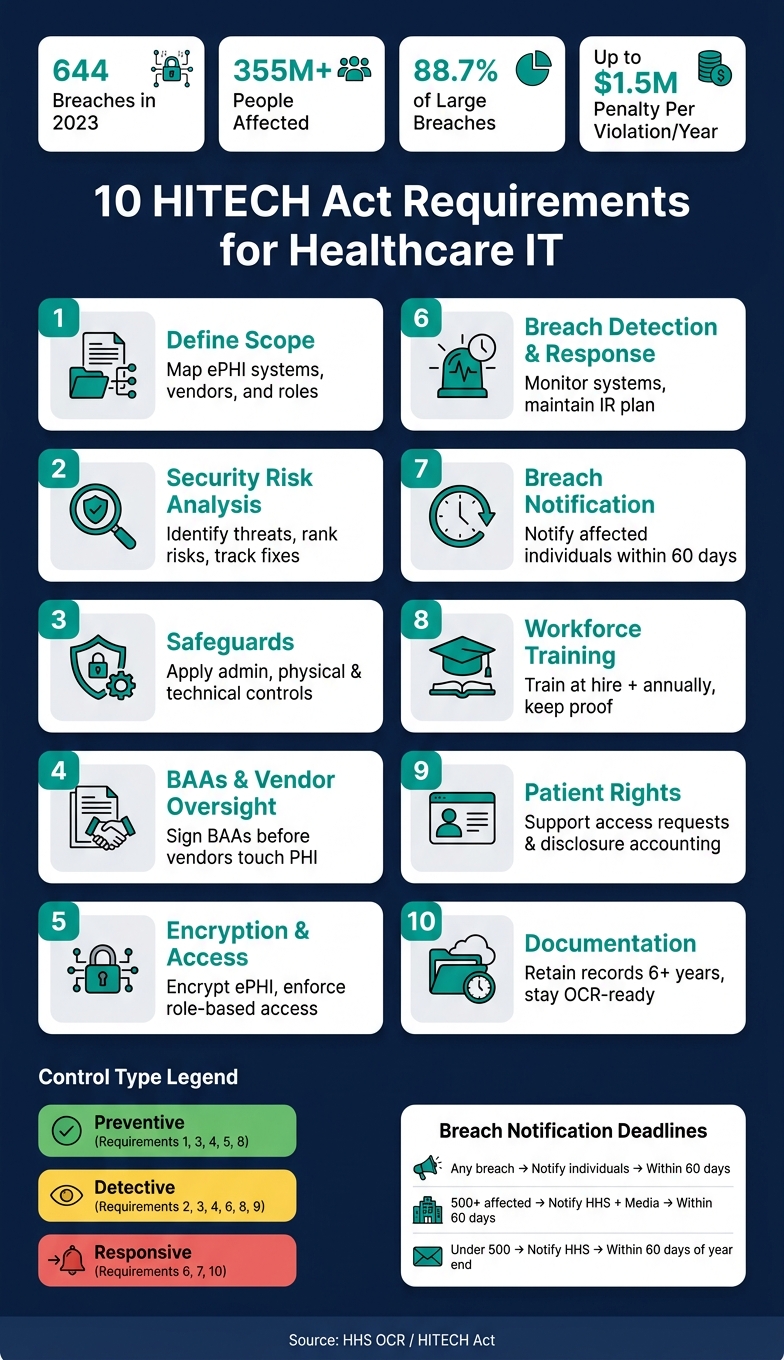
10 HITECH Act Requirements: Compliance Checklist for Healthcare IT
Mastering HIPAA HITECH Security Risk Assessments - A Step-by-Step Compliance Guide
sbb-itb-535baee
Quick Comparison
| Requirement | What I need to do | Main goal |
|---|---|---|
| 1. Scope | List ePHI, systems, vendors, and roles | Know what is in scope |
| 2. Risk analysis | Find threats, rank risk, track fixes | Reduce weak points |
| 3. Safeguards | Apply admin, physical, and technical controls | Protect ePHI |
| 4. BAAs and vendors | Sign BAAs and review vendors | Control third-party risk |
| 5. Encryption and access | Encrypt data and limit user access | Cut data exposure |
| 6. Detection and response | Monitor systems and use an IR plan | Catch and contain incidents |
| 7. Breach deadlines | Track discovery dates and send notices | Meet HHS timing rules |
| 8. Training | Train staff and keep proof | Cut user error |
| 9. Patient rights | Handle access and disclosure requests | Meet HIPAA/HITECH rights |
| 10. Documentation | Retain records and audit proof | Show compliance |
If I’m responsible for healthcare IT, this is the short version: map the data, lock down access, watch for incidents, move fast on notices, and document everything.
What HITECH Compliance Covers in Healthcare IT
Who Falls Under HITECH
Before you manage HITECH controls, you need to know who the law applies to. HITECH covers covered entities, business associates, and subcontractors. Covered entities include health plans, clearinghouses, and providers that conduct standard electronic transactions. Business associates and subcontractors that handle PHI or ePHI for those groups are also in scope, and they’re directly subject to HIPAA/HITECH.[9][10][12][14][18]
For healthcare IT teams, that has a plain meaning: every vendor that touches ePHI counts. And that includes downstream vendors too, not just the company you signed first.
Which Systems and Data Are in Scope
Once the responsible parties are clear, the next step is mapping the systems and data they touch. Any system that creates, receives, maintains, or transmits ePHI is in scope, no matter the platform or deployment model.[9][10][18]
That includes:
- EHRs
- Billing and portal systems
- Cloud databases
- Backup and recovery environments
- Networked medical devices linked to EHRs
- Mobile apps
- Integration tools
The data in scope is broad too. It includes diagnoses, lab results, medication lists, radiology images, and billing records tied to care.[10][18] Nonproduction environments with real ePHI are also in scope.[9][13][17]
This inventory is the starting point for risk analysis, access control, and vendor oversight. If you miss a system here, the rest of your compliance work can wobble.
How HITECH Expanded Accountability
That scope matters for another reason: HITECH changed who can be held directly accountable. It made business associates and subcontractors directly liable for Security Rule safeguards, improper uses or disclosures, breach notification, and downstream BAAs.[11][12]
For healthcare IT governance, that means business associate and subcontractor oversight isn’t just paperwork. It needs to be part of vendor onboarding, risk assessments, and day-to-day monitoring.
1. Define HITECH Scope for Covered Entities, Business Associates, and ePHI
With the scope set, the next move is simple: turn it into a written inventory and a vendor map.
Compliance obligation
Once you know what's in scope, assign controls based on each party's role. Business associates are directly subject to the HIPAA Security Rule, and subcontractors that handle ePHI for a business associate must meet the same level of safeguards.[9][16]
If you miss even one in-scope entity or vendor, you create a compliance gap. And that gap can lead to civil and criminal exposure.[11][20]
Required controls
BAAs need to spell out:
- permitted uses
- required safeguards
- breach timelines
- subcontractor flow-downs
Implementation priority
Start by confirming your role. Then map every ePHI system and vendor. After that, review BAAs for high-risk vendors to make sure safeguards and breach-reporting duties are clearly defined.[10][11]
That inventory feeds directly into risk analysis, access control, and monitoring in the next requirement.
2. Perform a Security Risk Analysis and Maintain a Risk Management Plan
Using the ePHI inventory from Requirement 1, perform a formal security risk analysis.
Compliance obligation
Under 45 C.F.R. § 164.308(a)(1)(ii)(A), covered entities and business associates must perform an accurate, thorough risk analysis of ePHI. Once that work is done, it should feed a risk management plan that assigns owners, deadlines, and follow-up checks for the safeguards to put in place, along with any residual risk leadership decides to accept. [25][26][28]
Required controls
A solid risk analysis starts with the ePHI inventory and data-flow map you already built. From there, identify threats and vulnerabilities, assess the likelihood and impact of each threat-vulnerability pair, rank risks in a consistent way, and document the method you used.
That review should cover common problem areas like:
- Ransomware
- Insider misuse
- Unencrypted devices
- Cloud misconfigurations
- Insecure medical devices
- Weak access controls
The risk management plan is where those findings turn into action. Say laptops aren't encrypted. That's not just a note in a report. The plan should assign full-disk encryption, device management, an owner, and a due date.
Operational evidence
OCR looks for proof that findings were tracked and fixed. In plain English, you need records that show the work didn't stop at the assessment. Evidence should include the completed risk analysis report, asset and data-flow inventories, the risk register, remediation tracking records, and vulnerability scan and penetration-test results. [24][25][28]
Implementation priority
Treat this as a repeatable program, not a one-time project. Refresh the analysis at least once a year and any time there's a material change, such as a new EHR module, a cloud migration, a ransomware incident, or a new business associate relationship. [22][23][27][28]
Risk platforms can help teams track assessments, remediation, and documentation over time. Those safeguards then flow straight into Requirement 3.
3. Put Administrative, Physical, and Technical Safeguards in Place
With the risk analysis done and the risk management plan in motion, the next move is simple: turn those findings into actual controls. The HIPAA Security Rule groups those controls into three buckets: administrative, physical, and technical safeguards. Your risk register should guide what gets handled first.
Compliance obligation
Covered entities and business associates must put safeguards in place across all three categories. Section 13401 applies the same safeguard and documentation duties to business associates as it does to covered entities. That means vendors that handle ePHI are directly on the hook for security failures.[10][31]
Required controls
Each category covers a different part of the environment:
- Administrative safeguards: policies, procedures, governance, sanctions, contingency planning, risk management, and training.
- Physical safeguards: badge-controlled server-room access, screen-lock rules for workstations, and documented hardware disposal or reuse procedures.
- Technical safeguards: unique user IDs, role-based access, multi-factor authentication for remote access, encryption for data at rest and in transit, audit logging, and TLS for secure transmission.
OCR complaint data points to common gaps in access management, training, incident procedures, and device and media disposal and reuse controls.[30]
Operational evidence
Proof matters here. That can include written policy versions with approval dates, facility access logs, hardware disposal certificates, IAM configuration records that show role assignments, sample audit logs, and MFA configuration records.
Implementation priority
Start with governance, access controls, and endpoint encryption. Those steps deal with core risk first. After that, add monitoring, incident response readiness, and third-party risk management.
Review all three safeguard categories every year and after major changes. These controls also need to carry over to vendors through BAAs and oversight.
4. Execute Business Associate Agreements and Strengthen Vendor Oversight
Controls inside your own organization have limits. Once a vendor touches patient data, your compliance boundary gets bigger. HITECH made that change official - and enforceable.
Compliance obligation
Before any vendor creates, receives, maintains, or transmits PHI on your behalf, you need a signed Business Associate Agreement (BAA) in place.[40][41][42] The BAA should spell out what each side must do to protect data and how each side will respond if there's a breach. Use the vendor inventory and risk ratings from Requirements 1 and 2 to decide where to focus first.
Subcontractors count too. Business associates must make sure any subcontractors that create, receive, maintain, or transmit PHI agree in writing to the same restrictions and safeguards.[39][41][17] So if a billing vendor relies on a cloud hosting provider, that provider is in scope as well.
Required controls
A compliant BAA should address:
- Permitted and prohibited uses of PHI
- Required HIPAA Security Rule safeguards
- Breach notification timelines
- Subcontractor duties
- Termination rights if a vendor does not fix a material breach[40][41][34][39][15]
On the day-to-day side, organizations should keep the vendor inventory from Requirement 1, use standard security questionnaires, and conduct effective third-party risk assessments for high-risk vendor relationships.[15][17][37] Censinet RiskOps™ can centralize third-party risk assessments, BAA status, and remediation tracking across clinical applications, medical devices, and supply chain partners.[15][17]
Operational evidence
You need audit-ready proof, not just signed paperwork. Keep a complete repository of executed BAAs tied to specific vendors and systems.[32][34][19] Hold on to security questionnaires, risk ratings, and any certifications or attestations gathered during due diligence. The same goes for breach notifications from vendors, plus the timeline and corrective actions tied to each one.[15][37][33][8][21][36]
Oversight records matter just as much. Reassessment results, remediation requests, and vendor responses help show that vendor review is an active process, not a one-time check-the-box task.[15][35]
Implementation priority
Start with vendors that have direct access to clinical systems, handle large amounts of ePHI, or support critical infrastructure. Make sure those BAAs are current, include HITECH-aligned breach notification terms that call for prompt vendor notice rather than waiting up to the 60-day outer limit, and are backed by documented security due diligence.[33][8][21][36][15][37]
After that, put a workflow in place that blocks any new vendor from getting PHI access until the risk assessment is done and the BAA is signed.[15][17] Once vendor access is under control, the next step is tightening who can reach the data those vendors handle.
5. Apply Encryption and Role-Based Access Controls
Compliance obligation
This requirement turns technical safeguards into two plain controls: encryption and role-based access. Under the HIPAA Security Rule, encryption is addressable. That sounds flexible, but there’s a catch: you either implement it or document why it isn’t reasonable.
In practice, if a risk analysis shows that laptops, mobile devices, backups, or cloud storage contain ePHI, encryption usually isn’t optional. It needs to be in place. And there’s a big reason for that: data encrypted in line with HHS guidance can qualify for a safe harbor. If an encrypted device is lost or stolen, that incident doesn’t automatically become a reportable breach.[38][3][5][43]
These controls tie straight back to the technical safeguards in Requirement 3.
Required controls
For encryption, the key is meeting the HHS standard for what counts as secured:
- Data at rest: Use storage encryption on laptops and other end-user devices. Extend that protection to servers, databases, and backup media.
- Data in transit: Use FIPS 140-2 validated cryptographic modules for transmissions to and from external networks.
For RBAC, each user should have access only to the ePHI needed for their job. That means mapping access to job function, such as nurse, billing specialist, HIM coder, or IT admin. It also means putting approval steps in place for role changes and making sure privileged accounts use separate credentials with tight controls.
Operational evidence
Auditors don’t stop at policy language. They want proof the controls are live.
For encryption, keep configuration baselines that show encryption is turned on across endpoints, databases, and backup systems. Pair that with key management policies and records of regular testing.
For RBAC, hold on to:
- access matrices
- provisioning and deprovisioning logs
- periodic access review records, such as quarterly attestations from department leaders
These records show the control is working over time, not just sitting in a policy binder. Once access is narrowed, the next step is proving encryption stays active and maintained. Censinet RiskOps™ can centralize evidence, attach audit artifacts, and track control operation over time.
Implementation priority
Start where the risk is highest: laptops, mobile devices, remote access points, and internet-facing clinical applications.
Enable full-disk encryption on all portable devices first. Then enforce TLS across EHR and patient portal access. After that, lock down email and file-sharing workflows that carry ePHI.
On the RBAC side, disable shared or generic accounts, require MFA for privileged access, and standardize role templates so teams can cut back over-privileged accounts fast. If you allow any encryption exception, document the exception, the compensating controls, and the reason behind it.
Once encryption and access controls are in place, the next step is breach detection and incident response.
6. Build Breach Detection and Incident Response Procedures
After access controls are in place, logging and response procedures help catch what prevention misses.
Compliance obligation
HITECH requires covered entities and business associates to identify, investigate, and report breaches of unsecured ePHI within a set timeline.[3][38]
Discovery begins when the breach is known - or when it should have been known through reasonable diligence.[43][36] That point matters a lot. If an organization has poor detection, it may have a hard time proving when discovery happened. During OCR investigations, that gap can turn into a serious problem.[46][47]
Required controls
Good breach detection and response depends on two parts working together: technical monitoring and clear procedures.
On the technical side, bring EHR, identity, network, email, and endpoint logs into one central monitoring system. Then add alerts tuned for healthcare activity, like unusual EHR access or large PHI exports, so suspicious behavior gets flagged fast.[48][50]
On the procedural side, each organization needs a formal Incident Response Plan (IRP). That plan should spell out roles ahead of time, including:
- an incident commander
- a privacy officer
- a security lead
- a legal/compliance contact
- a communications lead
The IRP should also define activation triggers, incident severity levels, and how business associates fit into the process.[48] For example, a severity model might mark active ransomware or data exfiltration as high, suspected unauthorized access as medium, and a contained event with no exposure as low.
Alerts shouldn't sit in a dashboard waiting for someone to notice them. They should flow straight into the incident response process. Business associates also need to notify covered entities promptly and include enough detail to support required notifications.[3][38][45]
Operational evidence
OCR expects root cause analysis and corrective action planning as part of a compliant breach response. In plain terms, it's not enough to say what happened. You need records that show how you investigated it, what you found, and what you changed after the fact.
The core documentation set includes:
- time-stamped incident records showing triage decisions, containment steps, forensic findings, and breach determinations
- copies of patient notification letters and HHS breach reports, along with send dates
- records of tabletop exercises or breach simulations, plus documented lessons learned[48][49][50]
Censinet RiskOps™ can centralize vendor incident reports and workflow history for third-party response tracking.
Implementation priority
Start with centralized logging for your most critical systems. At the same time, define your incident response team and escalation paths. After that, add deeper monitoring and standardize the breach determination workflow.
It also helps to connect incident response with enterprise risk management, especially for vendor issues, clinical systems, and supply chain follow-up.
Once detection and response are set, move to the notification deadlines in Requirement 7.
7. Meet HITECH Breach Notification Deadlines
After detection comes the deadline: notification has to move faster than the investigation.
Once a breach is discovered, the 60-day notification clock starts right away.
Compliance obligation
Discovery is the first day the breach was known, or reasonably should have been known. That 60-day window is the outside limit, not the goal. If a team waits until day 59, OCR can still view that as an unreasonable delay.[52][55]
Business associates also have to notify the covered entity within 60 days of discovery. That’s why BAAs should require much faster internal reporting.[8][21][55]
That puts a lot of weight on one thing: accurate discovery logging. If the discovery date is wrong, every later deadline can slip with it.
Notification duties change based on how many people were affected:
| Breach Scope | Who Must Be Notified | Deadline |
|---|---|---|
| Any number of individuals | Affected individuals | No later than 60 calendar days after discovery.[2][8][51][53] |
| 500+ individuals | Secretary of HHS | No later than 60 calendar days after discovery.[2][4][51][54] |
| 500+ individuals in a state/jurisdiction | Media outlets in the affected state or jurisdiction | No later than 60 calendar days after discovery.[4][54][58] |
| Under 500 individuals | Secretary of HHS | Within 60 days after the end of the calendar year in which discovered.[1][3][56][60] |
Required controls
The biggest risk here is a misdated discovery date. Record the discovery date at the first flag, not after forensic review. Use separate templates for 500+ breaches and under-500 breaches. And assign legal, privacy, communications, and vendor roles ahead of time so approvals don’t turn into bottlenecks when the clock is ticking.[56][2][60]
Use the incident log from Requirement 6 to track:
- discovery date
- breach scope
- notice deadlines
Vendors should notify you within 5 to 10 days of discovery, not at the far edge of the rule. That gives your team enough time to prepare downstream notifications.[8][55]
Operational evidence
OCR has penalized late notices in multiple cases, including PIH Health and Presence Health.[57][44][58]
To show compliance, keep an audit-ready log with the discovery date, breach scope, number of affected individuals, and the date each required notice was sent.[56][59][60] You should also retain timestamped copies of individual notice letters, HHS submissions, and media releases. Those records matter if OCR asks questions later.
Implementation priority
Start by locking down your discovery-date policy and logging process. Then update your notification templates and require vendor reporting within 5 to 10 days of discovery. After that, test the full workflow - from detection to approved notification - with a tabletop exercise before a live incident puts the process under stress.
Those deadlines only work if workforce escalation is fast and consistent. Once notice timing is under control, the next step is making sure staff can spot and escalate incidents fast.
8. Deliver Workforce Privacy and Security Training
Once your detection and notification controls are set, training becomes the next layer of protection. Incident response only works when people know what to spot and how to escalate it fast. Under HITECH, this training is not optional.
Compliance obligation
The HIPAA Security Rule requires organizations to "implement a security awareness and training program for all members of its workforce (including management)"[62][66]. HITECH extends that expectation across covered entities and business associates, including employees, volunteers, trainees, students, contractors under direct control, temporary staff, and vendor personnel with ePHI access.
Training should happen at onboarding, before any PHI access, and then again each year. You should also refresh it after major policy or system changes. OCR enforcement actions have penalized organizations when trainees or nursing students counted as workforce members but did not receive the required training.[63][68] That baseline sets up the privacy and security topics your program needs to cover.
Required controls
Training needs to address both privacy and security.
Privacy topics should cover:
- proper use and disclosure of PHI
- the minimum necessary standard
- patient rights
- disclosure accounting
Security topics should cover strong password and passphrase practices, multifactor authentication, phishing recognition, safe email and messaging use, device security, and incident reporting.
Make the training role-based. Front desk staff, clinicians, and IT teams do not face the same risks, so they should not get the exact same examples or drills. Phishing simulations can help here. In one hospital study, staff who completed IT security training were 4.2 times more likely to correctly report how to respond to spam or phishing emails than staff who had not completed training.[67]
Operational evidence
OCR audits and breach investigations don’t just ask whether training exists. They look for proof that it was delivered and enforced. Keep completion records for every workforce member, including dates, modules, scores, and attestations, for at least six years.[61][64][65] Keep older versions of the training too, along with their effective dates, so you can show what was in place at any point in time. Those records also help when you need to track and fix training gaps.
If someone misses training, document what happened next. That can include reminders, coaching, or disciplinary action. A clear paper trail shows regulators that the program has teeth.
Implementation priority
Start with onboarding. No system access until core training is done. After that, move into annual refreshers and phishing simulations.
Use a few simple signals to tune the program over time:
- completion rates
- phishing simulation results
- incident trends
If one department keeps struggling with phishing tests, that’s a sign the material needs work. Don’t just run the same lesson again and hope for a different result.
For business associates, put training expectations into your BAAs and collect proof during vendor reviews. That can include training policies, completion reports, and curriculum outlines. Censinet RiskOps™ can help centralize that vendor evidence, which makes it easier to show regulators that third-party training is being monitored.
9. Support Patient Access and Disclosure Accounting Requirements
Compliance obligation
Healthcare IT has to support two patient rights: access to PHI and an accounting of certain disclosures.
For access requests, covered entities must respond within 30 days. One extra 30-day extension is allowed, but only if the organization gives the patient a written explanation.[75][76] Patients also have the right to receive an accounting of disclosures covering the prior six years under HIPAA. HITECH shortened that window to three years for certain EHR-based disclosures tied to treatment, payment, and health care operations.[78][73][70] In plain English, that change removed the routine-disclosure exception for some EHR-based records.[78][73][80][82][70]
Required controls
Putting these rights into practice starts with a simple idea: know where disclosure data sits, and know how it moves.
Your controls should cover three main areas:
- Map the designated record set. This includes medical records, billing and payment records, lab reports, imaging, and clinical notes. Psychotherapy notes are excluded.[77][79][83]
- Set up disclosure logging across systems. EHRs and connected tools should log the date, recipient, PHI elements disclosed, and the purpose of the disclosure. Those logs also need to reflect disclosures made by business associates.[78][73][81]
- Build documented request workflows. You need a clear process for intake, identity verification, routing, and fulfillment so the 30-day deadline is met every time and each step is recorded.[75][76][85]
One detail trips people up: internal workforce access is a use, not a disclosure. So a standard audit log, by itself, does not meet an accounting request.[72][74]
Operational evidence
Good evidence is pretty concrete. It includes a documented accounting-of-disclosures procedure, request intake logs with timestamps, completed accounting reports, records showing how exceptions were applied, and system configuration records showing the EHR can produce the needed disclosure data.[69][71][72]
If business associates handle PHI for you, you also need records showing that their disclosures are included in the accounting. If not, you need proof that patients can be given a list of the relevant business associates to contact.[73][81][70]
Implementation priority
Start by mapping where disclosure data lives across your EHR and vendor stack. Then define which disclosures must be reported and which fall into accepted exclusions, such as disclosures made to the patient, disclosures made with patient authorization, or disclosures for national security purposes.[78][81]
After that, automate report generation where you can and run test requests on a set schedule. That’s the best way to see whether your workflow holds up when a real request lands in the queue.[85][86] These logs and workflows then serve as the evidence base for the documentation and audit-readiness requirement that follows. This preparation aligns with broader SOC 2 audit documentation standards often required in healthcare.
10. Keep Documentation, Retention, and Audit Readiness in Order
Compliance obligation
Once the controls from Requirements 1–9 are in place, the last job is keeping proof that they worked the way they were supposed to. HITECH requires HHS OCR to periodically audit covered entities and business associates for compliance with the HIPAA Privacy, Security, and Breach Notification Rules.[90] So documentation isn't just admin work in the background. It's a direct compliance duty.
Keep policies, procedures, risk assessments, breach logs, and notice copies for at least six years from the date they were created or last in effect, whichever is later.[88][43][38][89]
Required controls
Audit readiness starts with a full evidence trail. Track the records produced by Requirements 2–9, including risk work, BAAs, training, access reviews, incidents, breach notices, and disclosure records.
Those records should be easy to inspect. Use version control, assign a clear owner, note review dates, and follow a steady file-naming method. One useful way to manage this is with a compliance evidence matrix: a simple table that lists each HITECH-related control, the needed artifact, the team in charge, where the file lives, and how often it gets updated. That's usually the first thing an auditor will want to see.
Operational evidence
Auditors look for proof that you identified issues, fixed them, put controls in place, and checked that they worked. In plain terms, that means dated risk assessments, meeting minutes that show executive review, system-generated access logs, training completion reports, remediation tickets, and signed BAAs. Policies by themselves won't be enough if there's no record showing the controls actually ran.
Missing or expired BAAs are still a common enforcement problem.[91] OCR resolution agreements often last three years and call for updated policies, formal monitoring, and settlement payments. In many cases, the root issue comes back to weak documentation.[87][46][92][29][84][7]
Implementation priority
Start with the gaps that carry the most risk:
- a current risk analysis
- active BAAs
- workforce training records
- incident response artifacts
- clear retention rules for logs and breach records
Steady document control makes later audit requests much easier to handle. Censinet RiskOps™ can centralize third-party risk assessments, vendor reviews, and remediation tracking for fast audit retrieval.
Preventive, Detective, and Responsive HITECH Requirements
The 10 requirements above fit into three control types: preventive, detective, and responsive.
How the 10 Requirements Map to Control Types
Preventive controls are the ones meant to stop trouble before it starts. In this group, that includes encryption, role-based access, workforce training, and third-party vendor risk management. Detective controls help teams spot issues, so they cover audit logging, anomaly alerts, periodic risk reassessments, and breach detection procedures. Responsive controls deal with what happens after something goes wrong, including incident containment, patient notification, HHS reporting, and post-incident review.
Some requirements do double duty. A security risk analysis is a good example. It's preventive because it pushes remediation work forward, and it's detective because it brings gaps and vulnerabilities to the surface. Documentation and audit readiness also cut across all three categories. Policies help prevent drift, logs help detect odd activity, and records show that response steps were taken.
The table below maps each of the 10 requirements to its main control type, along with secondary roles where they apply.
| # | Requirement | Preventive | Detective | Responsive | Notes |
|---|---|---|---|---|---|
| 1 | Define HITECH scope (covered entities, BAs, ePHI) | ✓ | Establishes boundaries for all downstream controls | ||
| 2 | Perform a security risk analysis and maintain a risk management plan | ✓ | ✓ | Risk findings drive remediation; reassessments detect emerging gaps | |
| 3 | Put administrative, physical, and technical safeguards in place | ✓ | ✓ | Safeguards prevent incidents; monitoring detects policy violations | |
| 4 | Execute BAAs and strengthen vendor oversight | ✓ | ✓ | Due diligence prevents exposure; ongoing monitoring detects vendor risk changes | |
| 5 | Apply encryption and role-based access controls | ✓ | Encrypted data may eliminate breach notification obligations[93] | ||
| 6 | Build breach detection and incident response procedures | ✓ | ✓ | Detection identifies incidents; response procedures contain and remediate them | |
| 7 | Meet HITECH breach notification deadlines | ✓ | Responsive only: individual notices within 60 days; HHS and media notices are required for breaches affecting 500 or more individuals[8][53] | ||
| 8 | Deliver workforce privacy and security training | ✓ | ✓ | Training prevents errors; staff awareness supports incident reporting | |
| 9 | Support patient access and disclosure accounting | ✓ | Enables disclosure accounting | ||
| 10 | Keep documentation, retention, and audit readiness in order | ✓ | ✓ | ✓ | Policies prevent drift, logs detect issues, records prove response actions |
Risk analysis stands out for another reason. In one OCR review, it showed up in 14 of 22 enforcement actions.[94] That means a control that should help stop problems and spot weak points was often missing or poorly handled. Regulators put a lot of weight on this part of the framework.
This breakdown also makes one thing pretty clear: risk management platforms tend to help most with risk analysis, vendor oversight, detection, and evidence tracking.
How Risk Management Platforms Can Support HITECH Compliance
HITECH controls are much easier to handle when vendor, risk, and evidence work sits in one place. When teams rely on spreadsheets and email, things slip through the cracks. Risk management platforms bring vendor assessments, risk reviews, and documentation into a single system.
Vendor Risk and Business Associate Oversight
Tracking BAAs, renewal dates, and vendor reviews at scale is hard. A dedicated platform makes this simpler by keeping a central vendor inventory, tracking BAA status, and applying the same assessment workflow before any vendor gets access to ePHI.
Censinet RiskOps™ is built for healthcare. It supports third-party risk assessments, cybersecurity benchmarking, and shared risk workflows across PHI, medical devices, clinical applications, and supply-chain dependencies. Teams can track findings and remediation in one workflow, which helps keep documentation complete. That matters during an OCR review, where proof of steady vendor oversight matters.
That same setup also helps with risk tracking and audit evidence.
Risk Analysis, Workflow, and Documentation Support
A platform logs findings, assigns owners, tracks remediation, and shows which systems, devices, or vendors carry the most risk. This directly supports the risk analysis, vendor oversight, and remediation tracking covered in Requirements 2, 4, and 10.
Centralized platforms store evidence by control and make audit retrieval faster. Censinet RiskOps™ adds AI-assisted workflows, including automated questionnaire completion, evidence summarization, and risk report generation. That can cut assessment time without losing audit traceability.
That makes compliance faster to prove, not just faster to do.
Conclusion
HITECH compliance isn’t a one-time project. It’s an ongoing program. Put simply, these controls make HITECH compliance part of day-to-day operations.
Key Takeaways for Healthcare IT Leaders
Healthcare IT leaders need to manage HITECH across people, process, and technology. Strong programs line up all three so they work together instead of pulling in different directions.
The 10 requirements also work like a cycle: assess risk, cut exposure, spot incidents, respond fast, and document everything.
The pressure is hard to ignore. In 2023, large security breaches reached a record high - 725 incidents affecting 133,068,542 records, a 156% increase from 2022.[95][96]
Next Steps to Take
Start by reviewing current gaps and updating risk analysis after major changes. Then focus on managing third-party risk, access controls, and incident response.
It also helps to keep clear records of:
- risk reviews
- remediation work
- training
- access reviews
- BAAs
- logs
- breach workflows
FAQs
Who must comply with HITECH?
The HITECH Act applies to covered entities and business associates that handle electronic protected health information.
Covered entities include healthcare providers that send health information electronically as part of certain transactions.
Business associates include individuals, organizations, and subcontractors that create, receive, maintain, or transmit protected health information on behalf of a covered entity.
What counts as ePHI under HITECH?
Under the HITECH Act, ePHI means any protected health information that is created, received, stored, or sent in electronic form.
That covers patient data across a lot of places, including EHR systems, clinical applications, medical devices, mobile devices, and cloud platforms.
If that data has not been made unreadable, unusable, or indecipherable to unauthorized individuals, it counts as unsecured ePHI. And if unsecured ePHI is compromised, it falls under HITECH breach notification rules.
What should I do first for HITECH compliance?
Start with an enterprise-wide, documented security risk analysis. It shows where ePHI lives, what threats you’re dealing with, and which safeguards need attention first.
Before you begin, set the scope. Build an inventory of the systems, users, vendors, and data flows that touch ePHI. That gives you a clear map of what you’re reviewing instead of guessing as you go.
Do this at least once a year, and do it again anytime your organization goes through major business or technical changes.
