
If a cloud vendor stores or handles ePHI for you, I treat that vendor as a HIPAA business associate - and I need more than a BAA and a SOC 2 report to keep watch. With 82% of healthcare breaches in 2023 tied to cloud-stored data and the average breach cost at $10.93 million, the article’s main point is simple: paperwork alone is not enough.
Here’s the short answer:
- I first confirm whether the vendor creates, receives, maintains, or transmits ePHI on my behalf.
- I make sure the BAA spells out clear rules, like breach notice windows, subprocessor terms, logging, and proof requests.
- I monitor the vendor with tools that produce records I can use later, such as:
- SIEM
- cloud audit logging
- CSPM
- CASB/DLP
- I review high-risk vendors more often and re-check them after events like:
- a security incident
- a hosting change
- a new subprocessor
- a change in PHI scope
What matters most is this: HIPAA expects proof that controls are working, not just signed documents. So I look for things like access logs, config snapshots, incident records, and fix history.
Is the Cloud REALLY HIPAA Compliant? - 10 Critical Questions Answered!
sbb-itb-535baee
Quick comparison
| Tool | What I use it for | What it shows me |
|---|---|---|
| SIEM | Central log review and alerting | Access activity, admin actions, incident timelines |
| Cloud audit logging | Raw cloud event records | API calls, login attempts, object access, config changes |
| CSPM | Cloud setup checks | Public storage, weak IAM, missing MFA, disabled logging |
| CASB/DLP | PHI movement in SaaS, email, and file sharing | PHI uploads, risky app use, blocked transfers, data exfiltration signs |
So if I had to sum up the article in one line, it would be this: know when the vendor is a business associate, lock monitoring terms into the BAA, and use logging and cloud security tools to keep watch all year.
When is a cloud vendor a HIPAA business associate?
Start with the vendor’s role, because monitoring duties begin only after ePHI enters the cloud.
The core test is simple: does the vendor create, receive, maintain, or transmit ePHI on your behalf? If the answer is yes, the vendor is a business associate under HIPAA. That covers services like EHR hosting, analytics, backups, and telehealth.[25][26]
There’s one narrower carveout. A vendor that only transmits data, without storing it or having routine access, may be treated as a conduit instead of a business associate. But that line moves fast. Once a cloud provider stores or maintains ePHI, it falls into business associate status - even if it never reads the data.[27] That still applies when the data is fully encrypted and the vendor does not hold the decryption keys.
Just as important, legal status turns on what the vendor does, not what the paperwork says.[26][25]
What a HIPAA business associate agreement must cover for cloud services
A BAA for a cloud vendor needs to do more than check a box. It must lay out the day-to-day rules for handling ePHI.
At a minimum, the agreement must define permitted and prohibited uses of ePHI, require Security Rule safeguards, require breach and incident notice within stated timeframes, and include subcontractor obligations so any subcontractors the vendor uses are held to the same limits.[15][6][7][28]
A solid BAA should also spell out what proof the vendor has to provide on a recurring basis. Organizations can use automation to streamline security questionnaires and evidence collection for these reviews. That can include SOC 2 or HITRUST reports, risk assessments, pen test results, and incident metrics.
Which Security Rule safeguards apply most directly to cloud environments
Once business associate status is clear, the next step is figuring out which safeguards you can check on a steady basis.
HIPAA’s Security Rule groups safeguards into three categories: administrative, physical, and technical. All three apply to cloud vendors, but not in the same way.[14][18]
On the administrative side, risk analysis and risk management matter most. Cloud vendors should assess threats tied to their own setup, including misconfigured storage, overly permissive IAM roles, shared responsibility gaps, and cross-tenant vulnerabilities.[20][21] Healthcare groups should ask for written risk assessments that include data flow diagrams for PHI, inventories of services that touch ePHI, and timelines for fixing gaps.
Physical safeguards mostly sit with the provider, so the main job here is verification. SOC 2 Type II reports and data-location commitments are the usual places to look.
Technical safeguards are where active monitoring does most of its work. NIST SP 800-66 Revision 2 maps HIPAA’s five technical standards - access control, audit controls, integrity, authentication, and transmission security - to specific engineering controls.[19][24] In practice, that means checking for MFA on privileged accounts, encryption for ePHI, and audit-log retention that supports HIPAA audit evidence.[16][17][22][23]
Why certifications do not equal HIPAA compliance
SOC 2, ISO 27001, and HITRUST can help, but none of them is a HIPAA certification. A vendor may have all three attestations and still be missing a compliant BAA or the breach notification procedures HIPAA requires.[10][8][9] That’s why a signed BAA and direct checks of HIPAA-specific controls are still required.[12][13][11]
Those attestations set a starting point. Monitoring still needs to confirm how the controls work in the live cloud environment.
What healthcare organizations should monitor in cloud vendor compliance programs
Signing a BAA and finishing initial due diligence is just the beginning. After a vendor is onboarded, healthcare organizations need to check that controls still work in practice. HHS/OCR expects covered entities to understand how a cloud provider uses ePHI and to confirm that safeguards remain in place.[3][4][5]
The depth of monitoring should match the vendor's risk. That usually comes down to three things: how much PHI the vendor handles, how sensitive that data is, and how critical the service is to care delivery. Data like behavioral health records or genomic data calls for closer review.
At a minimum, monitor access, logs, encryption, training, incident reporting, and subprocessors. In practice, that work starts with the BAA. The agreement should spell out exactly what evidence the vendor must provide, so monitoring doesn't turn into a vague back-and-forth.
Which BAA clauses support ongoing monitoring
Use BAA clauses to require recurring evidence. That turns monitoring into a repeatable request instead of a scramble after something goes wrong.
| BAA Provision | What It Requires | Monitoring Evidence | Common Gaps |
|---|---|---|---|
| Logging & audit controls | Vendor enables, retains, and reviews access and administrative logs for ePHI systems | Log retention policies, SIEM reports, access log exports | Logging enabled but not centrally aggregated or reviewed |
| Encryption | Specified algorithms for PHI at rest and in transit; defined key management | Storage/database encryption configs, TLS scan results, key management policies | Databases encrypted but object storage buckets with PHI left unencrypted |
| Workforce training | HIPAA and security awareness training for all staff with PHI access | Training curricula, completion records, role-based training materials | Training completed at hire but not refreshed annually |
| Incident reporting | Breach and security event notice within defined timeframes, such as 24–48 hours | Incident logs, sample notification templates, post-incident root cause analyses | Vague timelines like "without unreasonable delay" with no defined window |
| Subprocessor transparency | Current list of subcontractors handling PHI; advance notice before adding new ones | Subprocessor inventories, downstream BAAs or equivalent agreements | List exists but is outdated or shared only on request |
| Evidence refresh | Periodic reassessments and updated risk documentation | SOC 2 reports, pen test summaries, updated risk assessments | Vendor provides a one-time SOC 2 report and considers the obligation met |
One of the most common BAA problems is wording like "vendor shall comply with HIPAA." That sounds fine on paper, but it's too loose when an incident happens. If the agreement doesn't name the operating rules, accountability gets muddy. The BAA should include specific requirements such as minimum log retention periods, named encryption standards, and maximum notification windows.[29][30]
A healthcare risk platform can help track clause deadlines, evidence requests, and missing artifacts.
Once the BAA defines the evidence standard, the next step is setting the review cadence based on risk.
How often should high-risk cloud vendors be reviewed
After evidence requirements are set, review frequency should follow vendor risk. Vendors that handle larger PHI volumes or connect more deeply into the EHR need a tighter cadence.
Tier 1 vendors, such as those storing large amounts of PHI or supporting core clinical workflows, should get quarterly targeted reviews plus a full annual reassessment. The quarterly reviews should focus on whether key controls still hold up: encryption settings, access provisioning, role-based access enforcement, recent vulnerability remediation, and audit log coverage. The annual reassessment should refresh risk assessment questionnaires, SOC 2 reports, pen test summaries, and incident-response records.[31]
Tier 2 vendors with lower PHI exposure, like cloud billing tools, usually fit a semi-annual or annual review cycle. Tier 3 vendors can often be reviewed once a year or every two years, with interim checks after material changes.
Scheduled reviews aren't enough on their own. Some events should trigger an immediate reassessment no matter where the vendor falls on the calendar. These include a reported security incident or suspected breach, a change in ownership or corporate structure, a shift in hosting regions, or an expansion in the PHI the vendor processes.[32][33] Those triggers should be written into both the vendor management policy and the BAA, along with a clear disclosure window so the vendor must notify you when one of these events occurs.
Vendor tiers can change over time. A Tier 2 vendor may not stay Tier 2 for long. If that vendor starts integrating directly with your EHR, the risk profile changes fast - and that becomes a Tier 1 discussion.
Monitoring tools that help verify HIPAA compliance in cloud environments
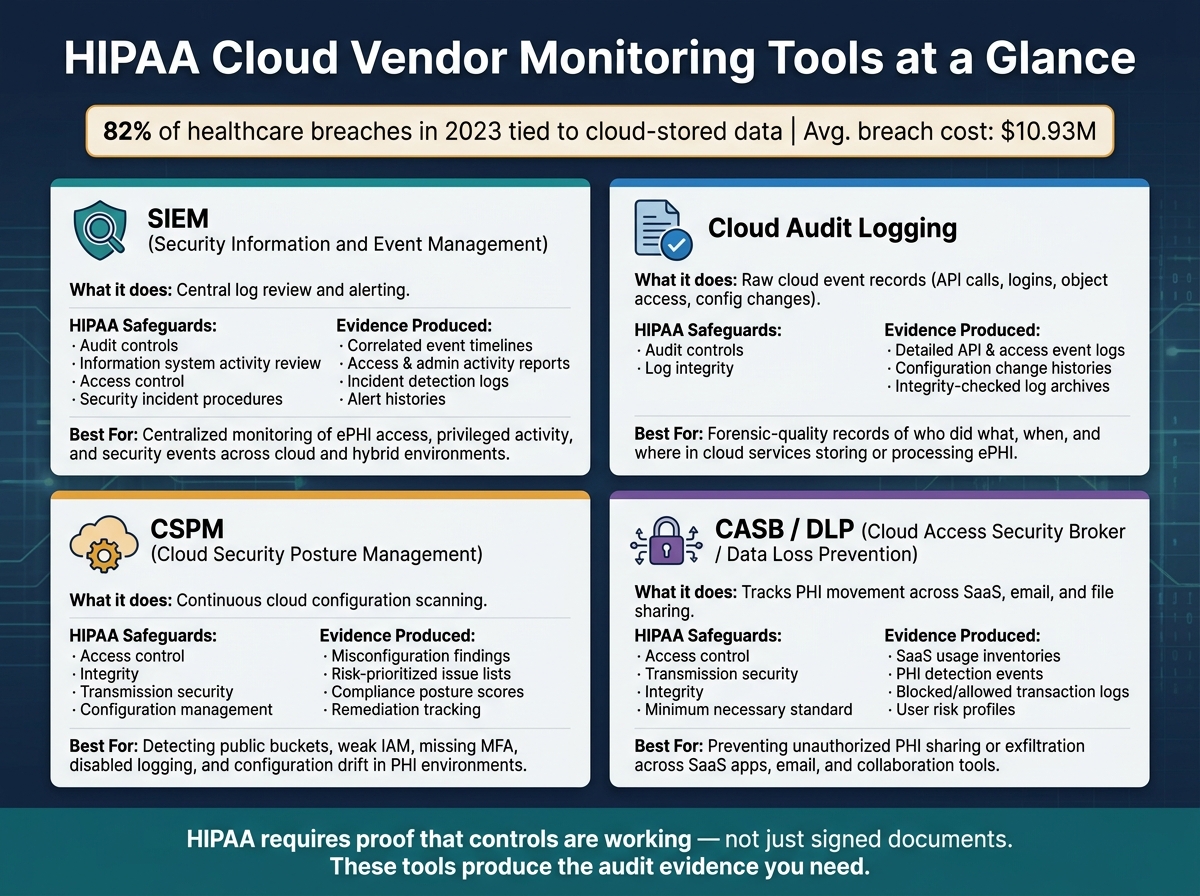
HIPAA Cloud Vendor Monitoring Tools: SIEM vs CSPM vs CASB/DLP vs Audit Logging
HIPAA doesn't require a certain product stack. It requires proof that your safeguards are in place and working. In cloud settings, that proof usually comes from monitoring and logging tools. The first job is simple: figure out which tools produce evidence you can stand behind during an audit or investigation. This is a critical component of third-party risk management for healthcare organizations.
How SIEM and cloud audit logging support HIPAA audit controls
HIPAA's audit controls standard (§164.312(b)) requires mechanisms that record and examine activity in systems containing ePHI. In cloud environments, that usually means cloud-native audit logging to collect raw events and a SIEM to pull those events into one place, connect them, and trigger alerts.[40][41]
Cloud audit logs track things like API calls, object access in storage, permission changes, and login attempts. That gives teams a record of who accessed ePHI, when they did it, where they came from, and which service they used. For long-term review and forensic work, those logs should be archived in immutable storage. A SIEM then brings those logs together with signals from identity providers, endpoint tools, and application layers, so security teams can review ePHI access in one place, spot odd behavior, and produce records for audits.
The SIEM should be set up to collect access, admin, authentication, and security-alert events for systems that store or transmit ePHI.[43]
HIPAA doesn't set a fixed log-retention period. Still, for high-risk cloud workloads, access and security logs should be kept long enough to support audits and investigations.[39] A practical setup is to keep newer logs in hot storage for fast searches, then move older records to immutable, lower-cost storage with write-once-read-many (WORM) settings. Integrity checks also matter. They help show that the logs remained reliable during a breach review or OCR audit.[42]
Logs tell you what happened. CSPM and CASB help show whether the setup made that event possible in the first place.
What CSPM and CASB or DLP tools reveal about PHI exposure
CSPM checks cloud configuration. CASB and DLP track how PHI moves through SaaS, email, and collaboration tools.[37][36]
CSPM tools continuously scan cloud environments for misconfigurations such as public buckets, databases without encryption at rest, overly permissive access controls, missing MFA on privileged accounts, disabled logging on PHI-relevant services, and drift from approved configurations. They also produce prioritized fix recommendations, which helps healthcare organizations cut the risk of accidental PHI exposure and document monitoring and corrective action tied to HIPAA's technical and administrative safeguards.[37][38][34]
CASB and DLP focus on a different problem: what happens once PHI starts moving. A CASB can find both approved and unauthorized SaaS use, rate apps by risk, and watch user behavior. That includes flagging PHI uploads to unauthorized services or large downloads to unmanaged devices. DLP engines inspect content with pattern-based and machine learning-based methods to detect PHI in files, messages, and transfers. From there, they can block, quarantine, encrypt, or require a reason before the data is sent.[36][35] Put together, these tools help enforce HIPAA requirements tied to access control, transmission security, integrity, and the minimum necessary standard across the SaaS layer.
| Tool Category | Primary HIPAA Safeguards Supported | Typical Evidence Produced | Best Fit Use Cases |
|---|---|---|---|
| SIEM | Audit controls; information system activity review; access control; security incident procedures | Correlated event timelines; access and admin activity reports; incident detection and response logs; alert histories | Centralized monitoring of ePHI access, privileged activity, and security events across cloud and hybrid environments |
| CSPM | Technical safeguards for access control, integrity, and transmission security; configuration management | Misconfiguration findings; risk-prioritized issue lists; compliance posture scores; remediation tracking | Continuous assessment of cloud infrastructure and platform configurations impacting PHI security |
| CASB/DLP | Access control; transmission security; integrity; minimum necessary standard | SaaS usage inventories; PHI detection events; blocked/allowed transaction logs; user risk profiles | Governing PHI movement in SaaS apps, email, and collaboration tools; preventing unauthorized sharing or exfiltration of PHI |
| Cloud audit logging | Audit controls and log integrity | Detailed API and access event logs; configuration change histories; integrity-checked log archives | Forensic-quality records of who did what, when, and where in cloud services that store or process ePHI; supporting investigations and compliance audits |
The next step is turning these findings into alerts, tickets, and vendor action.
How to build continuous monitoring workflows for cloud vendors
Once your tools start producing evidence, the next job is simple to say and harder to do: get each signal to the right owner fast.
That only works when security, compliance, and third-party risk teams work from one shared vendor record. Security brings logs and alerts. Compliance tracks BAAs and attestations. Third-party risk manages tiers, findings, and renewals. If those pieces live in separate places, things slip through the cracks.
Use continuous monitoring for high-risk events, and set immediate escalation for anything that could expose ePHI. Put the most attention on vendors that:
- store large amounts of ePHI
- support clinical systems
- have admin access
Which signals should trigger action for HIPAA-related vendor risk
Not every alert should set off the same response. A missed BAA renewal isn't the same as a public storage bucket with regulated data.
For each signal, define three things up front: the trigger, the owner, and the deadline. Every trigger needs a clear response path. That's how you cut alert fatigue and avoid missed incidents.
| Monitoring Source | Typical Alert | Action | Target Response Time |
|---|---|---|---|
| external breach intelligence | Vendor discloses a security incident | Initiate risk review, confirm PHI impact, open an incident ticket, evaluate HIPAA breach notification obligations | Within 24 hours |
| Cloud posture tools (CSPM) | Public storage bucket containing regulated data | Isolate exposure, verify whether ePHI is present, and require remediation evidence from the vendor | Same business day |
| Access monitoring / SIEM | New privileged account created outside change control | Validate authorization, review least-privilege controls, and confirm no unauthorized ePHI access | Within 24 hours |
| BAA and contract tracking | BAA renewal due or service scope changed | Initiate renewal or amendment, confirm the PHI scope is still accurate, and update the vendor record | Promptly |
| Vendor-reported subprocessor change | New subprocessor added | Review the subcontractor's controls, confirm BAA coverage extends to the new party, and document the decision | Promptly |
| Backup and availability monitoring | Failed DR test for an ePHI system | Require a remediation plan, verify retest results, and assess impact on availability safeguards | Promptly |
| Regulatory and public signals | Adverse regulatory finding or enforcement action against the vendor | Escalate to compliance leadership, reassess the vendor risk tier, and review contractual remedies | Immediately |
Some BAAs now require vendors to report breaches within 24 to 72 hours of discovery, well ahead of HIPAA's 60-day notification window for covered entities.[46][44][45] That changes the math. Breach detection has to be a day-to-day monitoring priority, not something you deal with later.
How healthcare-specific risk platforms support cloud vendor oversight
The simplest setup is one vendor record that holds everything in one place. Keep each vendor's BAA status, risk tier, alerts, findings, and remediation status tied together so teams aren't piecing the story together from different systems.
Censinet RiskOps™ centralizes third-party risk assessments, monitoring signals, and audit-ready documentation for healthcare vendors and HDOs. Censinet AI™ speeds up the process by helping vendors complete security questionnaires faster and by automatically summarizing evidence and documentation.
Conclusion: Key priorities for monitoring HIPAA compliance in cloud vendors
In practice, strong cloud vendor oversight starts with the basics: confirm business associate status, lock in BAA monitoring terms, and connect continuous monitoring to specific HIPAA safeguards. HHS guidance makes this clear. Risk analysis is an ongoing process, not a once-a-year checkbox. Utilizing on-demand cyber risk management ensures these assessments remain current.[48][49]
That only works if the BAA gives you the power to ask for proof. In plain terms, the agreement should let you require:
- audit rights
- breach timelines
- subcontractor coverage
- recurring evidence like security reports, log access, remediation status, and control testing[3][47][14]
The tools matter too, but they need to map back to the right HIPAA standards. SIEM and audit logs line up with audit controls and incident procedures. CSPM maps to risk management, integrity, and transmission security. CASB and DLP support access control, minimum necessary, and transmission security.[14][17]
When this is done well, oversight cuts vendor risk, speeds up audit response, and reduces disruption during incidents. You end up with stronger compliance, faster response, and cleaner audit evidence.[14][2][1]
FAQs
How do I know if a cloud vendor is a business associate?
A cloud vendor is a business associate under HIPAA if it creates, receives, maintains, or transmits electronic protected health information for a covered entity. That holds even if the vendor is small, works outside healthcare, or has only a limited role in the setup.
This also includes “no-view” services. In plain English, a vendor can still count as a business associate even if it never looks at the data and doesn’t hold the decryption keys. If it stores or handles that information on behalf of a covered entity, the rule still applies.
That means the vendor must sign a Business Associate Agreement (BAA) and follow HIPAA Security Rule requirements.
What proof should I ask a cloud vendor to provide?
Ask for documented, independent evidence - not just verbal assurances.
Key proof includes:
- Current SOC 2 Type II reports and HITRUST CSF certification
- Evidence of AES-256 encryption at rest and TLS 1.2/1.3 in transit
- Incident response, penetration test, breach notification, audit log, access control, and staff training records
You should also keep a signed BAA on file. If a vendor says a BAA isn't needed, ask for written proof under 45 CFR 164.514(b).
Which monitoring tools matter most for HIPAA oversight?
For HIPAA oversight of cloud vendors, the main tools are:
- SIEM to bring together and connect vendor audit logs, API events, and identity activity
- UEBA to spot insider risk or threat anomalies based on normal activity patterns
- Cloud-native controls like GuardDuty, Config, and Security Hub to flag threats and HIPAA-related configuration or compliance issues
These tools help with near-real-time detection, alerting, and automated containment where possible.
