
One weak open-source component can help cause a PHI breach, service outage, or care delay. In healthcare, that risk is not small: about 80% of healthcare, health tech, and life sciences codebases used OSS by 2022, and in 2024, 81% of reported PHI breaches were tied to hacking and IT incidents.
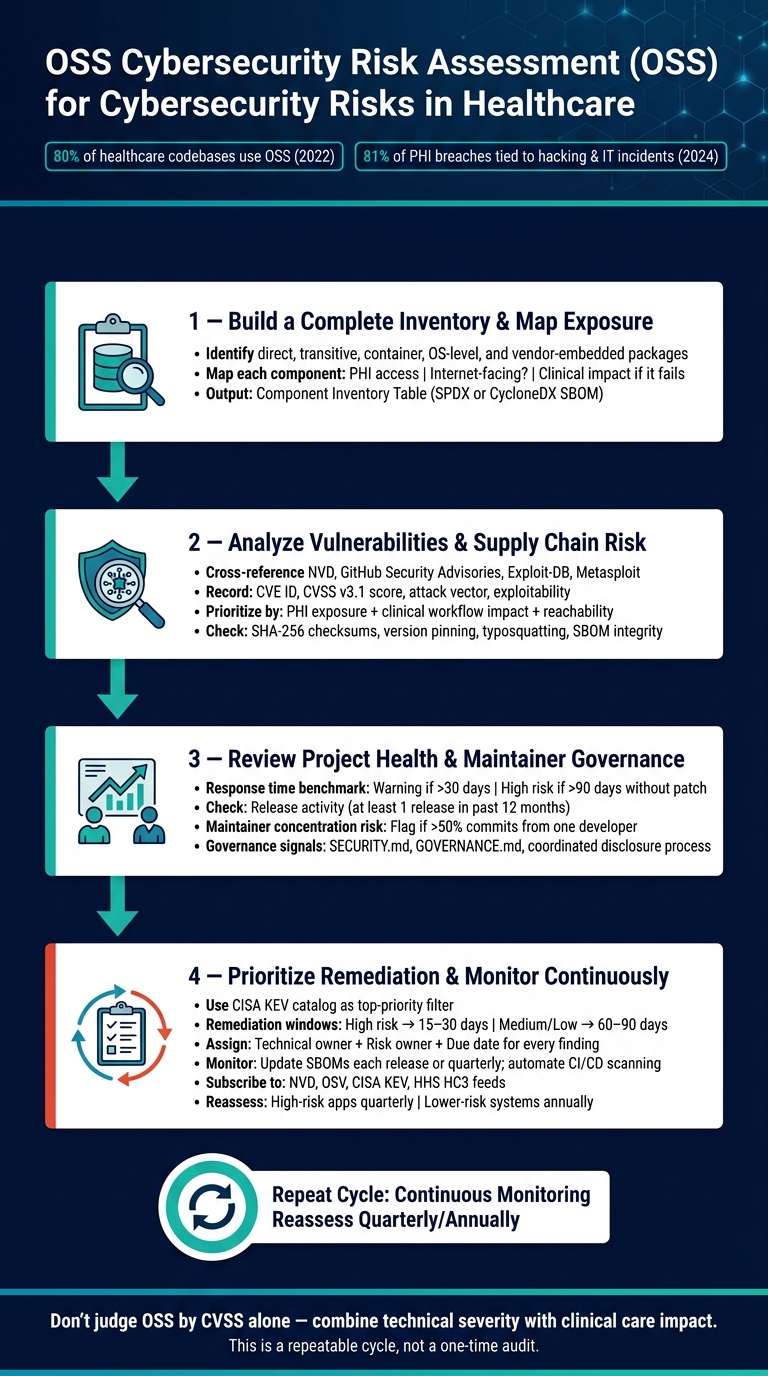
If I were assessing OSS for healthcare use, I’d keep it simple:
- List every OSS component - including direct, transitive, container, OS-level, and vendor-embedded packages
- Map each one to risk - PHI access, internet exposure, system role, and patient care impact
- Check known issues - CVEs, advisories, exploit activity, and reachable attack paths
- Review project health - maintainer response time, patch history, and security disclosure process
- Set fix priorities - based on clinical impact, exploitability, and system uptime risk
- Track it over time - with SBOM updates, alerts, and repeat reviews
Here’s the core idea in plain English: don’t judge OSS by CVSS alone. A medium-severity flaw in a medication workflow tool may matter more than a high-severity flaw in an isolated internal app. I’d make decisions using both technical risk and care-delivery impact.
A few checks matter most:
- Do I have a current SBOM in SPDX or CycloneDX format?
- Do I know where this package runs and what data it can reach?
- Is there a public exploit or known exploited issue?
- Are maintainers still active and shipping fixes?
- If I delay patching, what control is in place and when does that exception expire?
This article lays out a plain, repeatable review process for healthcare teams that use OSS in apps, libraries, containers, scripts, and vendor products.
How to Assess Open-Source Software for Cybersecurity Risks in Healthcare
Managing Open Source Software Security in your organization
sbb-itb-535baee
Step 1: Build a complete inventory and map business exposure
Start by building a complete inventory of all OSS in scope, including dependencies your team didn’t add by hand. That means direct, transitive, and OS-level dependencies. If even one of those is missing, you can end up with blind spots that create patient care and uptime risk in a clinical setting.
Identify direct and transitive dependencies
Use package-manager inventory commands and SCA tools to find both direct and transitive dependencies across source code, build files, and container images. [2][3][4][5]
Don’t stop at application packages. Include container OS packages and vendor-embedded OSS in the scan. Ask for SBOMs for EHR plugins, FHIR gateways, medical device middleware, and HL7 engines, then treat each one as its own product in scope. [4][7][8]
Pull all scan results into one inventory with the package name, version, source, license, and dependency path. And treat transitive dependencies as first-class entries, not little notes buried at the bottom. [8][9]
Once you have the inventory and exposure map in place, Step 2 can zero in on which components are vulnerable and exploitable.
Map each component to clinical and operational context
For every component in the inventory, document four things: where it lives, whether it can access PHI, whether it’s internet-facing or limited to internal networks, and what happens if it fails.
In plain English, that means tying each package to the system or module it supports, such as an EHR integration service, patient portal, imaging viewer, or device gateway. Then note whether it touches PHI, whether outside users can reach it, and what kind of clinical impact a failure would cause, like delayed orders, blocked medication workflows, or system downtime. [1][4][6]
Use architectural diagrams and data flow maps to trace each component from the user interface through app tiers to databases and external systems. Mark each link with PHI classification and clinical criticality. Platforms like Censinet RiskOps™ can help formalize this work by linking OSS components and vendors to specific clinical workflows, PHI risk categories, and impact scenarios.
Use a component inventory table to support review
Use one table to tie technical facts to healthcare exposure so security, clinical, and operations teams can review the same picture. At a minimum, each row should include the package name, version, dependency level, function in the system, owner, and risk rating. [1][4][6]
| Package | Version | Dependency Level | Function | System / Module | Owner | PHI Access | Internet-Facing | Risk Rating |
|---|---|---|---|---|---|---|---|---|
Update this table at each major release, after new vendor onboarding, and monthly. Use it as the input for vulnerability analysis and remediation ranking in the next step.
Step 2: Analyze vulnerabilities and supply chain risk
Use your inventory to figure out which components are vulnerable, exploitable, and tied to patient care. Not every flaw carries the same risk. A vulnerability matters most when it can touch PHI, disrupt clinical workflows, or affect uptime.
Check CVEs, advisories, and exploitability
Cross-reference each component against NVD, vendor advisories, and GitHub Security Advisories. For each issue, record the CVE ID, CVSS v3.1 score, and attack vector. Then rank findings based on exploitability, reachability, and clinical impact.
Put the highest priority on issues that are easier to exploit, exposed to more networks, and more likely to affect patients. A critical flaw in an internet-facing patient portal that handles PHI needs faster action than the same flaw on an isolated internal system. Also check whether public exploits are available in places like Exploit-DB or Metasploit, and whether the vulnerable code path is actually reachable in your setup based on deployment architecture, network segmentation, and compensating controls.
For clinical systems, availability should carry extra weight. A flaw that could interrupt a medication administration system or an ICU monitoring feed should move ahead of one tied to a back-office reporting tool, even when the raw CVSS scores look similar. For medical devices and nearby systems, rate any patient-harm risk on its own instead of relying only on technical severity.
Once you understand exposure, look at whether the package itself can be trusted.
Review package integrity and source trust
Healthcare supply chain security challenges also cover typosquatting, dependency confusion, and slopsquatting. Stick to approved package sources, internal mirrors, and private registries. Require SHA-256 checksums and signatures for packages and container images, and pin versions with lockfiles so unreviewed updates don't slip in. You should also verify SBOM integrity before treating it as your source of truth.
Use these checks to decide what needs remediation first.
Use a findings table to rank remediation priority
Use the findings table as a risk register for security, clinical, and IT owners. Put every issue in the same register so security and clinical teams can judge risk on the same scale. Rank entries using CVSS, exploit maturity, system criticality, PHI exposure, and compensating controls.
| Recommended field | Purpose |
|---|---|
| Component name and version | Identify the OSS package in scope |
| Vulnerability or issue | Record the CVE ID or supply chain concern |
| Severity | Capture technical and healthcare-adjusted severity |
| Exploitability | Note whether public exploits exist or the issue is theoretical |
| Affected systems and workflows | Tie the issue to clinical and operational impact |
| Data sensitivity | Note whether PHI, PII, or operational data is involved |
| Compensating controls | Document segmentation, access controls, or other mitigations |
| Remediation action | Track patching, configuration changes, isolation, or replacement |
| Owner | Assign the team or individual accountable |
| Due date / status | Drive escalation and follow-up |
The end result should be a short list of issues, each with an owner and due date. That makes ownership clear and helps teams handle escalation and remediation tracking across security and clinical operations.
Step 3: Review project health, governance, and maintainers
Vulnerability data shows what's broken today. Project health shows whether a fix is likely to show up before a flaw reaches clinical systems.
That difference matters. A component may have no current CVEs and still be risky if the maintainer base is inactive. The moment a new flaw is disclosed, that project can turn into a problem if no patch follows.
Measure maintainer responsiveness and release discipline
Start with response time. Check how fast maintainers reply to new security issues. A healthy project should show a prompt first reply, ideally within days. If 30+ days pass without acknowledgment, treat that as a warning. If 90+ days pass without a patch, treat it as a high-risk signal.
Then look at release activity. The project should have shipped at least one release in the past 12 months. Also check whether security fixes land in dedicated patch releases instead of being pushed off with no clear date. When fixes move slowly, the odds go up that a vulnerable component reaches clinical use unchanged.
Maintainer concentration matters too. If one developer accounts for more than 50% of commits or has sole merge access, incident response depends heavily on that one person's availability. That's a weak spot. Foundation-backed or funded projects usually have stronger patch capacity.[11]
If the project responds slowly, move that component higher in the remediation queue.
Confirm governance and disclosure practices
After speed, check whether the project has a clear way to make security decisions and handle disclosures.
Look for a GOVERNANCE.md file, or something similar, that explains who makes decisions, how changes get reviewed, and how security-related contributions are handled. A CONTRIBUTING.md file should lay out the review process, so you can judge whether code changes - including security fixes - get serious scrutiny before release.
For disclosure, SECURITY.md is the baseline. It should explain:
- how to report issues privately
- whether the project accepts encrypted submissions
- what response timelines reporters should expect
Published security advisories and coordinated disclosure are good signs. They show the project has a working security response process. In healthcare, that's not a nice extra. It's what you want when a zero-day hits a component used in clinical applications or medical devices.
If governance is vague or missing, count that as a risk factor when setting remediation priority.
Use these findings to set remediation priority.
Step 4: Prioritize remediation, document decisions, and monitor continuously
With exposure mapped and risks ranked, the next step is simple: fix what matters most first.
Build a healthcare-specific remediation plan
Turn findings into a working plan with priorities, owners, deadlines, and monitoring. Score each finding based on clinical impact, PHI exposure, reachability, exploitability, and dependency criticality.[16][17][21] A flaw in an OSS library inside a public-facing patient portal should rank much higher than that same flaw in an internal analytics tool with no PHI access.
A good starting filter is the CISA Known Exploited Vulnerabilities (KEV) catalog. If an issue is known to be exploited, internet-facing, or tied to authentication and identity on tier-1 clinical systems like EHR, imaging, and lab platforms, it belongs at the top of the queue.[12][13][16][17] Use remediation windows to keep work moving: high risk in 15–30 days; medium or low risk in 60–90 days or during routine maintenance.[21]
For each finding, assign:
- A technical owner
- A risk owner
- A target due date (MM/DD/YYYY)[21]
If patching gets delayed because a vendor is slow to respond or downtime could affect care, document that choice. Record the reason, the compensating controls, and the expiration date.[21]
Once those priorities are set, bake them into continuous monitoring.
Set controls for OSS governance
Monitoring can't be a one-and-done task. Update current SBOMs with each release, or at least quarterly, for both direct and transitive dependencies.[12][13][15][20] Add automated dependency scanning to CI/CD. Then subscribe to NVD, OSV, CISA KEV, and HHS HC3 feeds, with alerts focused on PHI-bearing and clinically critical systems.[12][13][16]
High-risk internet-facing apps should be reassessed quarterly. Lower-risk systems can be reviewed annually.[16][17][21] OSS review should also be part of change management and vendor onboarding. Any new third-party integration or dependency change that touches PHI workflows should trigger a review before deployment.[13][18]
Use the same component inventory and findings register each time so reassessment starts from a stable baseline. Track MTTR, closure rate, and SBOM coverage.[12][13][16][17][21]
Conclusion: A repeatable process for safer OSS use in healthcare
The process in this guide - inventory, vulnerability and supply chain analysis, project health review, and continuous monitoring - is a repeatable cycle, not a one-time audit.
Evidence-based OSS review, with documented findings tied to clinical impact and PHI exposure, supports HIPAA Security Rule obligations and gives you a defensible record in the event of an OCR review after an incident.[13][18][10] Just as important, it cuts down the time an unpatched OSS component can affect patient care or expose sensitive data. A structured process - supported where needed by platforms like Censinet RiskOps™ to centralize assessments, track remediation, and manage third-party vendor risk at scale - helps healthcare organizations use open-source software with less risk.[14][19] This cycle keeps OSS review current as systems, dependencies, and threats change.
FAQs
How do I start if I don’t have an SBOM?
Start by asking the manufacturer for a Software Bill of Materials (SBOM). Many vendors will provide one, even for older products, and that can save you a lot of time.
If an SBOM isn’t available, use binary analysis tools to figure out which components are inside the product. From there, focus first on high-risk clinical assets and put compensating controls in place, like network segmentation, while you build a formal inventory.
Which OSS risks should healthcare teams fix first?
Healthcare teams shouldn’t rely on raw vulnerability scores alone. They need to rank OSS risk based on where the asset sits in clinical and day-to-day operations.
Start with vulnerabilities linked to active exploitation, PHI exposure, clinical criticality, and internet-facing exposure. Systems that support diagnostics, EHR access, or remote monitoring deserve closer review. If a patch isn’t available right away, use compensating controls like network segmentation.
How often should OSS risk reviews be repeated?
OSS risk reviews shouldn’t be a one-and-done task. They need to happen on a regular basis, and the review cadence should match the asset’s risk level.
High-risk assets, like patient-facing applications or systems that handle protected health information, need frequent reviews plus continuous automated monitoring. These are the places where small issues can turn into big problems fast.
Lower-risk items can usually be reviewed quarterly or semiannually. It also makes sense to trigger a review when something changes in a meaningful way, such as:
- A major software update
- A dependency change
- A security incident
- A new regulatory requirement
